
Video · 14:37
Free POS software tutorial for beginners: the complete walkthrough
A 15-minute walkthrough of the free SaleFlowPoint POS: products, stock, customers, expenses, a sale, refunds, the cash drawer and your shop website.


Watch the screens before you sign up. Each video has its own page with a written summary, chapters where it has them, and links to the matching guide or article.
A 15-minute walkthrough of the free SaleFlowPoint POS: products, stock, customers, expenses, a sale, refunds, the cash drawer and your shop website.

A one-minute tour for new users: today's sales and low-stock alerts on the dashboard, the quick-action tiles, and a menu grouped by the job you are doing.

See the SaleFlowPoint till open on your products: tap a picture or scan a barcode, change quantities, give a discount and take payment on one screen.
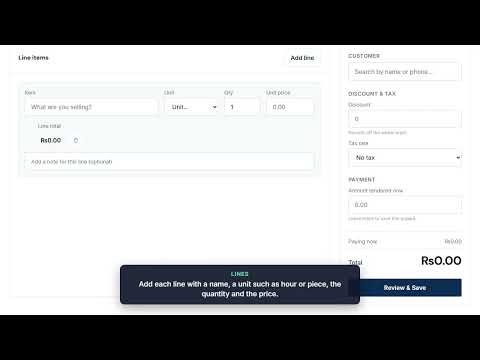
Bill labour, repairs and one-off items that are not in your catalogue on a proper A4 invoice, with units, discount, tax and full, part or no payment.

Track what every customer owes: balances, payments that settle the oldest invoices first, a credit limit per customer and a statement for any period.

Record money a customer pays you: find them, enter the amount and method, and let SaleFlowPoint settle the oldest open invoices or pick them yourself.

How sales, purchases, payments and expenses post to a double-entry ledger by themselves, with profit and loss, a balance sheet and repeating expenses.

Put your logo on receipts, invoices and reports, preview and adjust the receipt, and build your shop website without code, with a phone preview first.

Your shop website at the free saleflowpoint.com/c/your-shop address or at your own domain: what customers see, when a domain is worth it, and moving later.

Put your shop website at www.yourshop.com: open DNS Settings, copy the records to your domain company, and wait for the page to say Active.

Appointments shown on a spa: services with lengths, online booking from the website, phone bookings, the agenda and the week calendar to confirm or move.

Set up online appointments step by step: services and reminders, staff and their hours, a booking link and QR code per person, the diary and analytics.

A salon with four stylists: each with own hours, online booking with no double booking, phone bookings, the diary by stylist and Google Calendar sync.

A dental clinic with four dentists: services, the clinic's website, online booking to whoever is free, phone bookings, reminders and Google Calendar.
Shorter clips are on our YouTube channel. Prefer reading? Try the user guide or the blog.
One shop and one till are free with no time limit, and registering needs no card.