

Features / Custom domain
Your own domain
Connect a custom domain to your website
A business card reads better with www.yourshop.com than with a long shared address, and customers remember it. On a paid plan, you can connect a domain you own to your SaleFlowPoint website, so visitors stay on your own address while they browse your pages.
What you get
- Your name in the address bar: your website, services, shop and booking pages show on your domain.
- A secure address: the certificate for https is arranged for you, with nothing to buy or renew.
- No separate hosting: your website stays where it is and you keep editing it in the same place.
- Your domain stays yours: you keep it at the company you bought it from. SaleFlowPoint does not sell domains.
What you need first
- A paid SaleFlowPoint plan, or a running trial.
- A published website.
- A domain you already own, and access to its DNS settings at the company you bought it from.
How to connect it
- Open DNS Settings. It is in the Website menu.
- Enter your address. Use www.yourshop.com or shop.yourshop.com.
- Copy the records. SaleFlowPoint shows four records. Add them at your domain company, in short or full form, whichever it asks for.
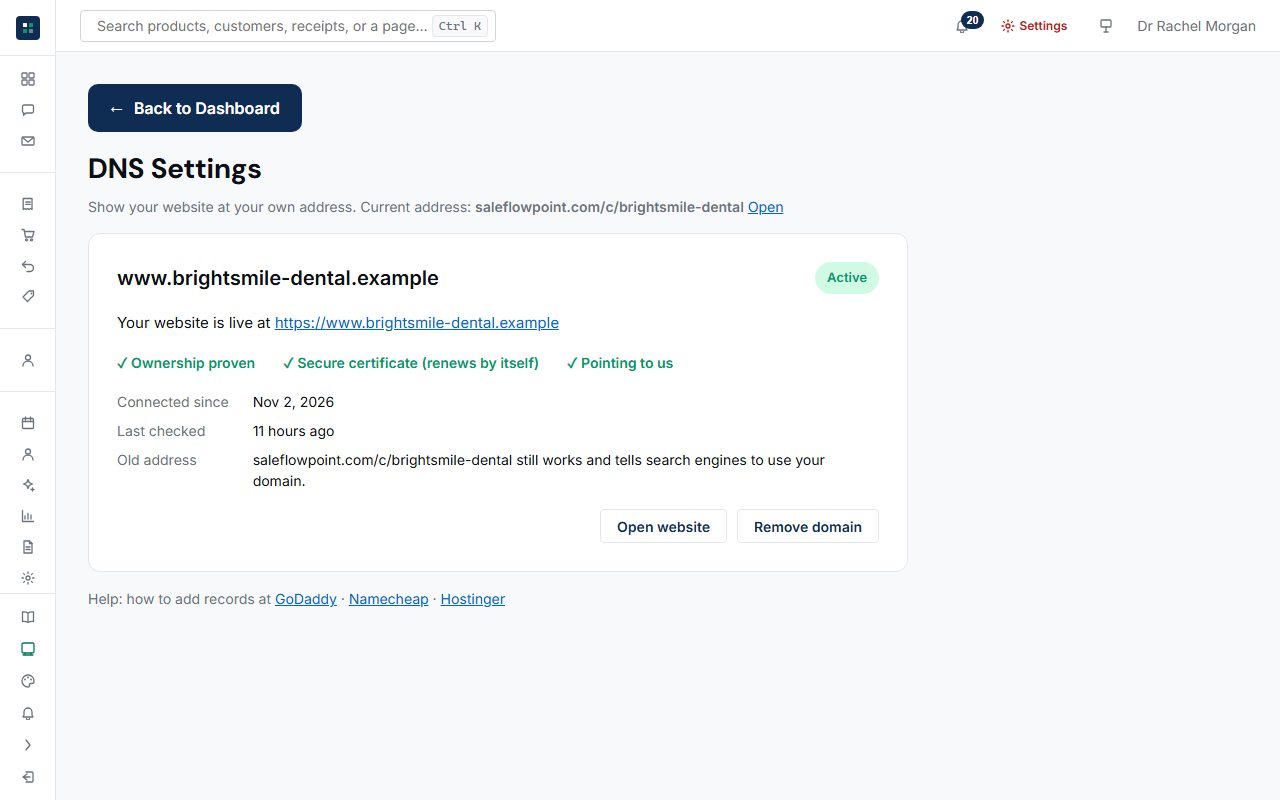
- Wait for the three ticks. They confirm ownership, the certificate, and that the domain points to your site. Press Check now to look again.
DNS changes can take time to spread across the internet. A change can take from minutes to a day or more, depending on your provider.
Why www, and what about the bare domain?
A bare address such as yourshop.com cannot be connected directly, for a technical reason: most domain companies do not allow the kind of record it would need. Connect www.yourshop.com, then ask your domain company to forward yourshop.com to it. Most offer this as a simple setting.
What your customers see
On your domain, your site opens at these addresses:
- www.yourshop.com for your home page
- www.yourshop.com/services for your services
- www.yourshop.com/shop for your products
- www.yourshop.com/book to book an appointment
Customer chat and staff sign-in still open on saleflowpoint.com. Your old saleflowpoint.com/c/your-shop address keeps working and tells search engines that your domain is the main one, so the two do not compete.
If something needs attention
The page shows your domain's state at all times: waiting, active, needs attention or paused. We email you when it goes live, and if it needs attention. If a problem lasts seven days, the domain is paused. Reconnect once the records are right.
If your plan ends
Your own domain needs a paid plan. If a trial ends unpaid or payment stops, the domain is disconnected at once and your site carries on at saleflowpoint.com/c/your-shop. Pay again and you can reconnect it. Nothing on your website is lost.
Who it suits
Any business with a domain, or ready to buy one: shops, clinics, salons, restaurants and consultants. It matters most if you print your address on signs, cards or packaging. Build the site first with the website builder, then connect your domain when you are ready.
Questions
Is a custom domain included in the free plan?
No. On the free plan your website is at saleflowpoint.com/c/your-shop and works fully, but it cannot use your own domain.
Can I buy a domain from you?
No. Buy one from any domain company and connect it here.
Which domain companies work?
Any that lets you add the DNS records shown. We link to help for popular ones such as GoDaddy and Namecheap.
Will my email stop working?
The records add web addresses and proof of ownership, and do not replace your mail records. Check with your domain company if you are unsure.
Can I remove it later?
Yes. Press Remove in DNS Settings. You are asked to confirm first.
Do staff links change?
Each staff link keeps its saleflowpoint.com address, so anything printed with it keeps working if a domain lapses. While your domain is active, you can also copy a staff link on your own domain, but use the main address for print.
Related pages
Guides, videos and examples
Put your own name on your website
Choose a paid plan, connect your domain and keep everything else as it is.