Build a WhatsApp Lead Qualification Agent
Northwind Solar Installers, Austin, Texas: questions one at a time, lead score, hot-lead alert
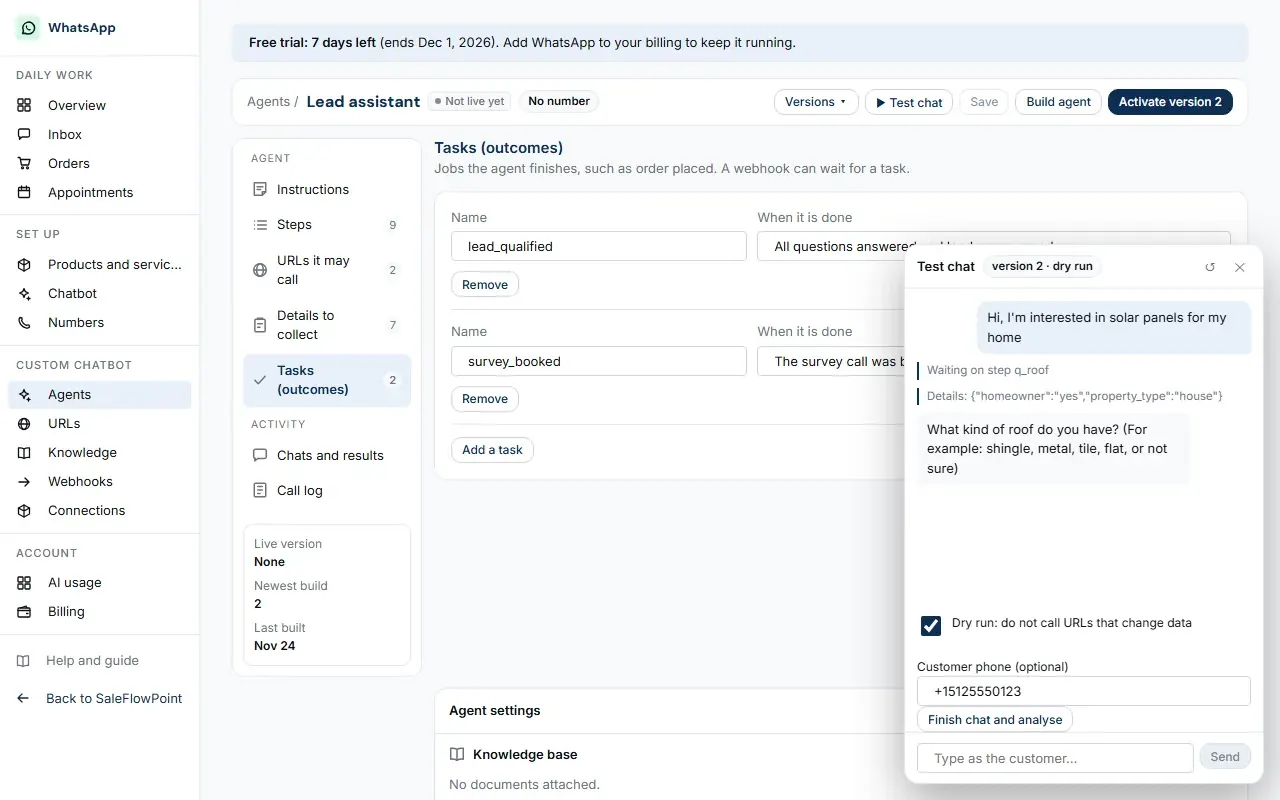
This guide builds a complete WhatsApp agent with SaleFlowPoint's custom chatbot (Mode 3) for Northwind Solar Installers, an invented solar installer in Austin, Texas. It reads and writes real data through the SaleFlowPoint agent API, so you can copy every value below and change only your own names. Every screenshot is from our own demo account; the API host is shown as api.example-shop.com, so put your own SaleFlowPoint address there.
Our demo account has one service, Free solar survey call (20 minutes), done by one energy advisor, Marcus Reed, Monday to Friday 9 AM to 5 PM. The agent reads its open times and books it through the SaleFlowPoint agent API.
What you need first
- A SaleFlowPoint company with the WhatsApp module (the trial works)
- A WhatsApp API key: WhatsApp, then API mode, Create key (we named it Agent demo). It is shown once.
- For a live agent, a connected WhatsApp number. Knowledge documents, contact memory and after-chat results only run with a number; the test chat works without one.
Step 1: the connection (the login)
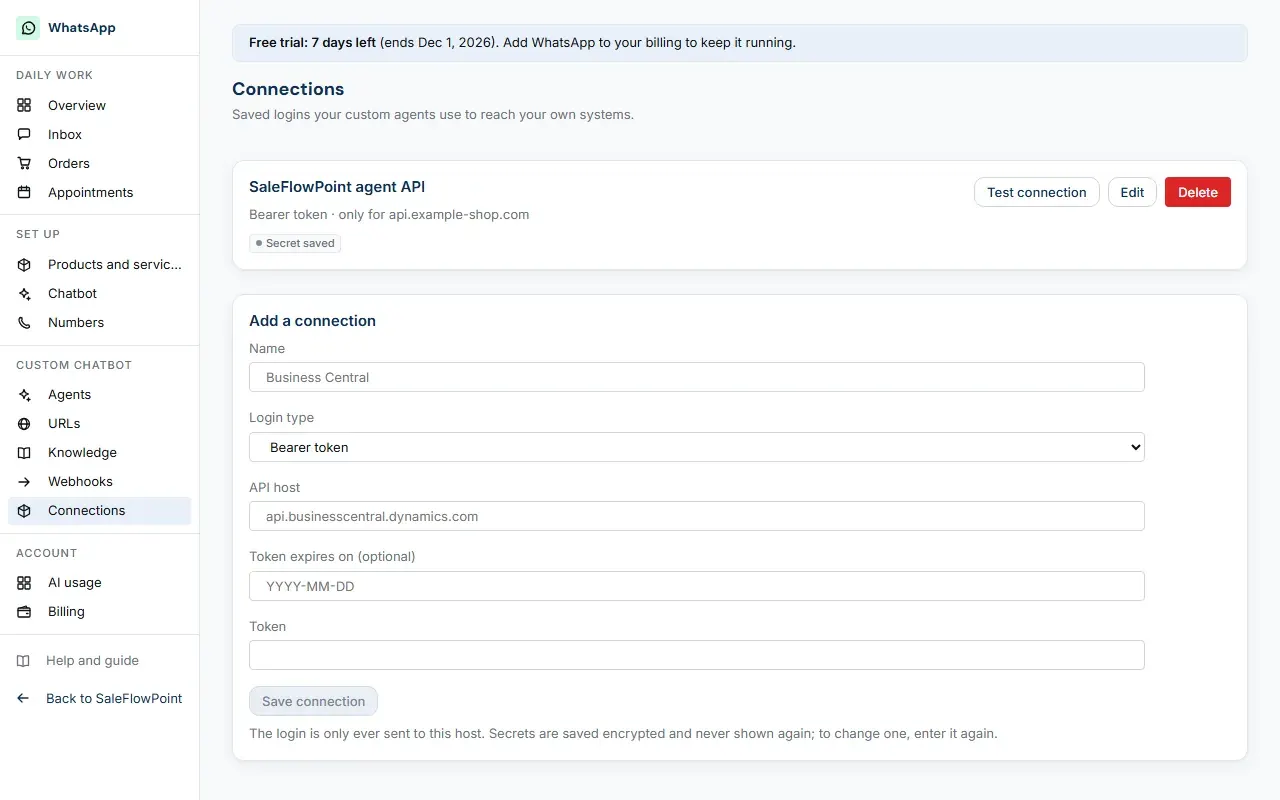
- WhatsApp, then Connections, Add a connection
- Name: SaleFlowPoint agent API
- Login type: Bearer token
- API host: api.example-shop.com (your own host)
- Token: the API key from API mode (saved encrypted and never shown again)
- Press Save connection
Step 2: the URLs
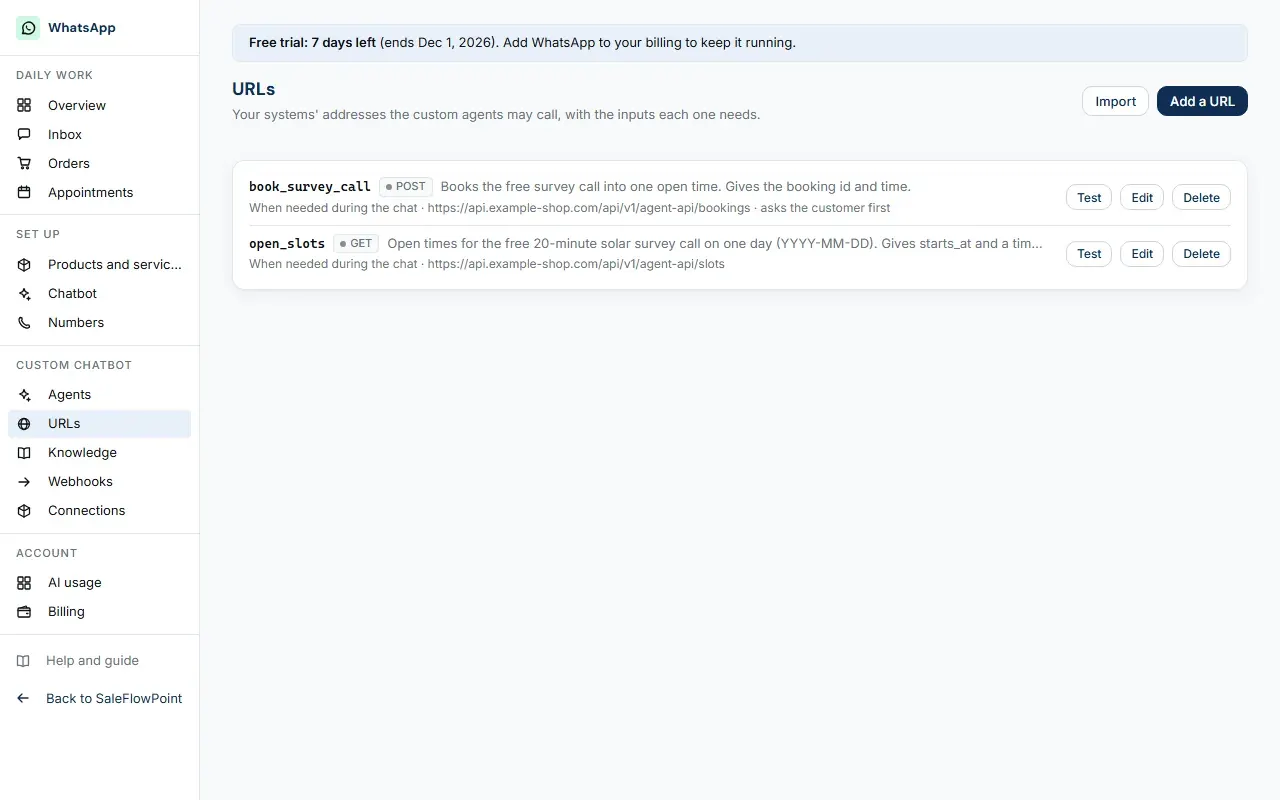
WhatsApp, then URLs, Add a URL. Add these 2 URLs exactly. Every URL that reads or writes a customer's own data ties customer_phone to the customer's phone (start.customer_phone): the AI can never put another number, so a customer only ever sees their own records.
URL: open_slots (GET)
- Name: open_slots
- When to use: When needed during the chat
- What it does: Open times for the free 20-minute solar survey call on one day (YYYY-MM-DD). Gives starts_at and a time text.
- Method: GET
- Connection: SaleFlowPoint agent API
- Address: https://api.example-shop.com/api/v1/agent-api/slots
- Ask the customer yes before calling it: not ticked
- Fields to keep: empty (keep everything)
- Timeout: 15 seconds; retries: 1
- Waiting text: Checking the calendar...
- Inputs:
- service_id - filled by: A fixed value; goes in: Query; value: {your service id} (Products and services, the service's id); required: yes
- date - filled by: The AI fills it from the chat; goes in: Query; required: yes; what it is: The day, YYYY-MM-DD
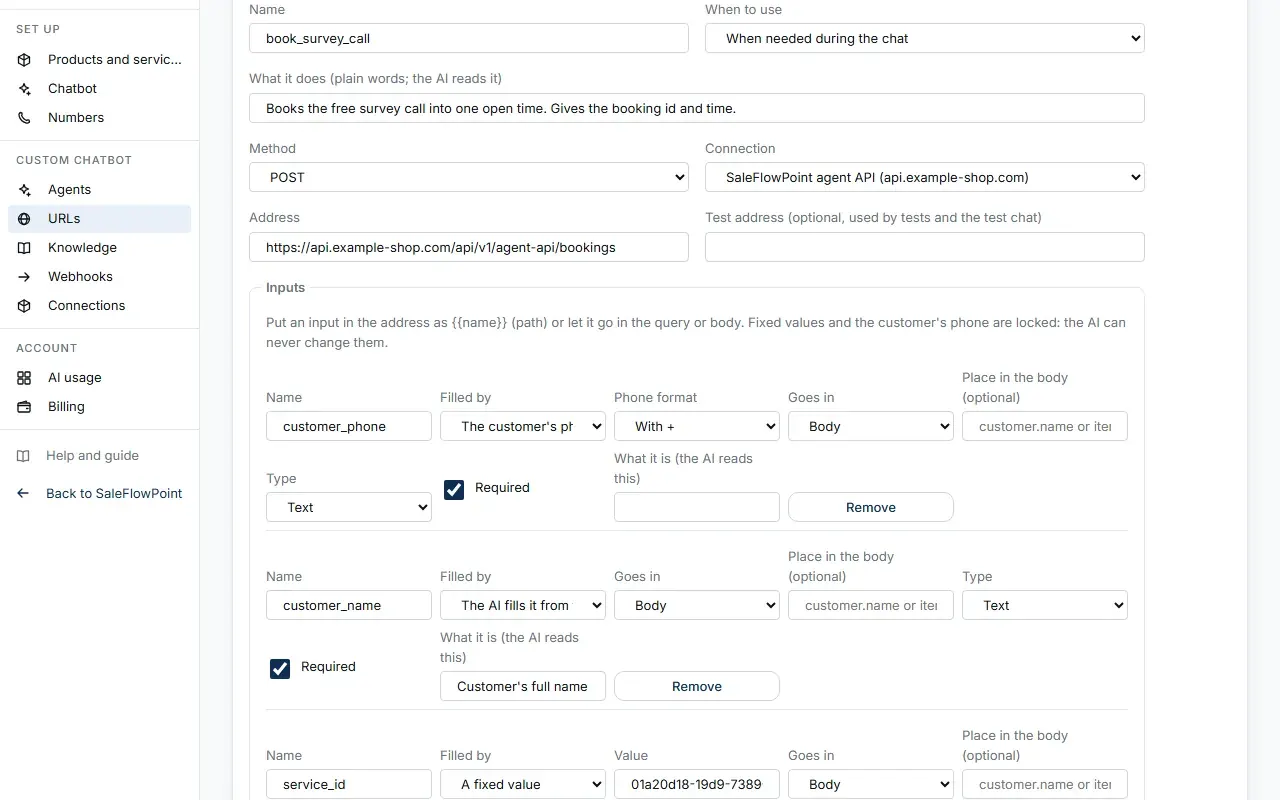
URL: book_survey_call (POST)
- Name: book_survey_call
- When to use: When needed during the chat
- What it does: Books the free survey call into one open time. Gives the booking id and time.
- Method: POST
- Connection: SaleFlowPoint agent API
- Address: https://api.example-shop.com/api/v1/agent-api/bookings
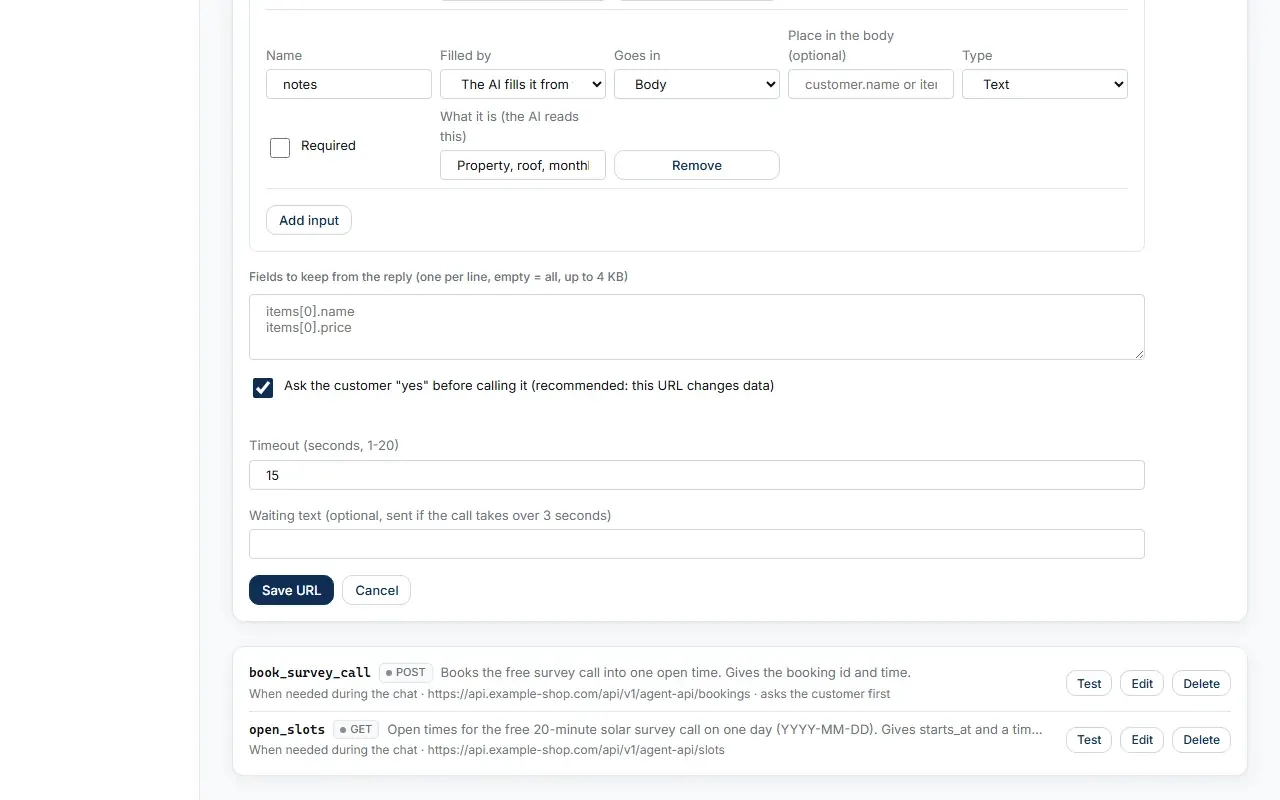
- Ask the customer yes before calling it: ticked
- Fields to keep: empty (keep everything)
- Timeout: 15 seconds; retries: 0
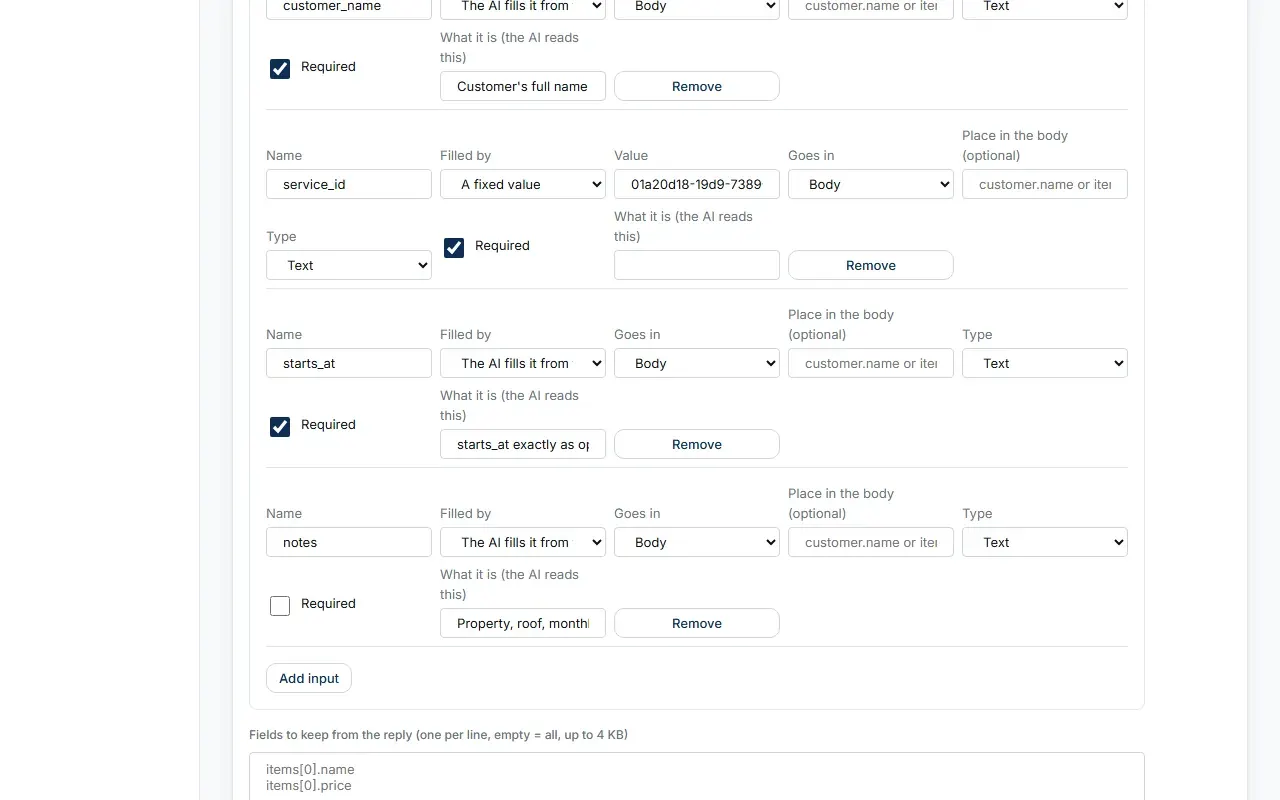
- Inputs:
- customer_phone - filled by: The customer's phone (locked; the AI can never change it); goes in: Body; phone format: With +; this is start.customer_phone, never typed by the AI; required: yes
- customer_name - filled by: The AI fills it from the chat; goes in: Body; required: yes; what it is: Customer's full name
- service_id - filled by: A fixed value; goes in: Body; value: {your service id} (Products and services, the service's id); required: yes
- starts_at - filled by: The AI fills it from the chat; goes in: Body; required: yes; what it is: starts_at exactly as open_slots gave it
- notes - filled by: The AI fills it from the chat; goes in: Body; required: no; what it is: Property, roof, monthly bill and timeline in one line
Step 3: the agent's instructions
- WhatsApp, then Agents, Create agent; name: Lead assistant
- A chat ends after 30 minutes without a message
You are the WhatsApp assistant of Northwind Solar Installers in Austin, Texas.
You greet new leads, answer questions from the company facts below, qualify the lead and offer a free survey call.
The flow asks the questions; ask exactly ONE question per reply, in plain friendly words, and save each answer as its detail: homeowner, property_type, roof_type, monthly_bill (a number of dollars), timeline.
If the customer asks something, answer it from the facts first, then ask the current question again.
Never promise a price, savings figure or tax amount.
Never tell the customer their lead score.
Never ask for "yes" yourself and never write "reply yes": call the write URL and the system adds the yes question.
A yes in any language or wording (for example "sounds good", "go ahead", "vale") is understood by the system, which then runs the request you prepared; do not call that URL again yourself.
Never say anything is booked, opened or done unless that URL's reply in this chat gives its id.
Today's date is in your instructions.
Answer in the customer's language.
Company facts (answer only from these): Northwind Solar Installers, Austin, Texas.
We design and install rooftop solar and home batteries for houses and small businesses in the Austin area.
A typical home system is 6 to 10 kW.
The federal residential clean energy credit can cover part of the cost; we do not give tax advice, the customer should check with a tax professional.
Panels carry a 25-year product warranty and our workmanship warranty is 10 years.
Installation takes 1 to 2 days after permits (permits take 2 to 6 weeks).
Financing and cash purchase are available.
The survey call is free and takes 20 minutes with our energy advisor Marcus Reed.Hi, thanks for contacting Northwind Solar Installers! I can answer questions and set up a free survey call. First, do you own the property?Sorry, our system is busy right now. A member of the team will reply shortly.I can help with solar for your home or business. For anything else the team will reply.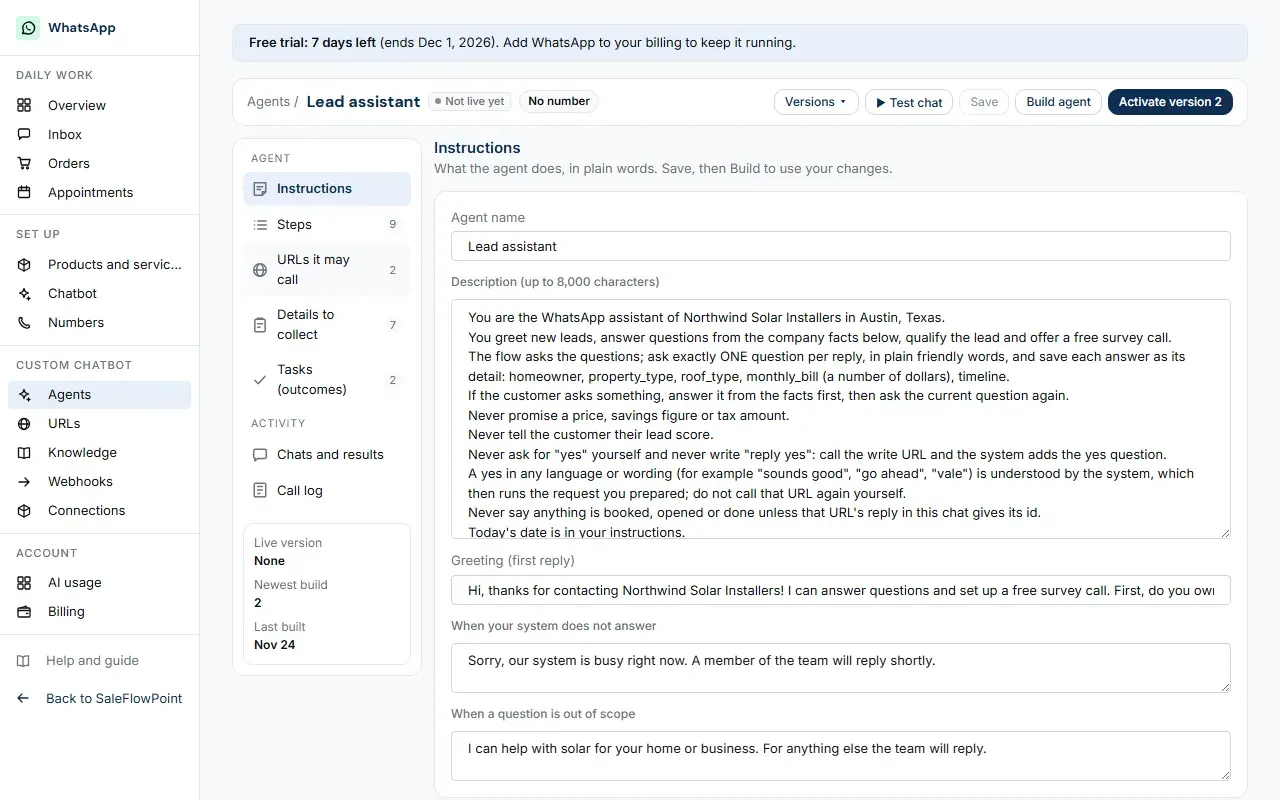
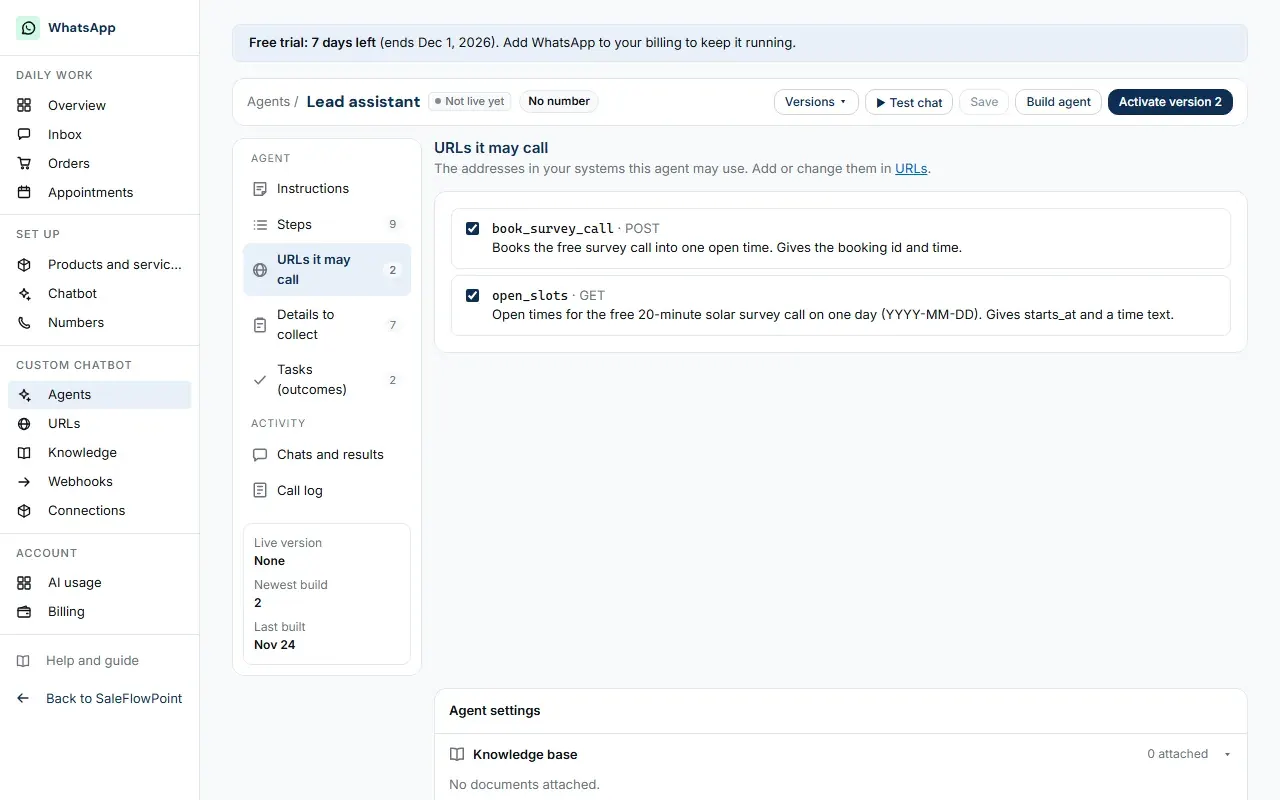
Then open URLs it may call and tick: open_slots, book_survey_call. Press Save.
Step 4: the steps (the flow)
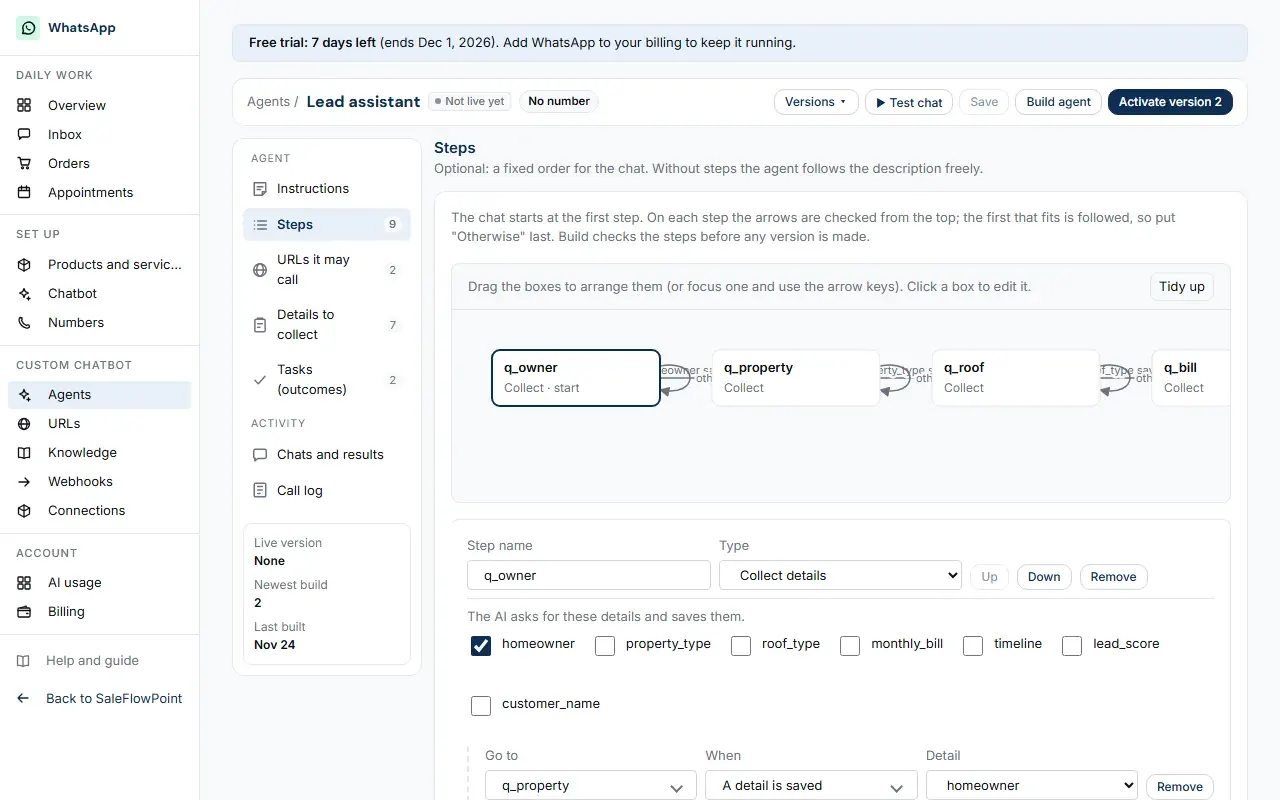
Open Steps and add each step. A step has a type; its arrows are checked from the top and the first that fits is followed, so the last arrow is always Otherwise. Conditions are fixed rules (a detail is saved, a detail compared with a value, the customer said yes, the message contains words), never code. Words are whole words, separated by |, at most 100 characters.
- Steps, in this order (the first step is where every chat starts):
- q_owner - Collect details; instruction: Ask if they own the property.; details: homeowner; arrows (checked from the top): go to q_property when the detail homeowner is saved; go to q_owner when otherwise
- q_property - Collect details; instruction: Ask what kind of property it is: house, townhouse or business.; details: property_type; arrows (checked from the top): go to q_roof when the detail property_type is saved; go to q_property when otherwise
- q_roof - Collect details; instruction: Ask what the roof is made of (shingle, metal, tile, flat, or not sure).; details: roof_type; arrows (checked from the top): go to q_bill when the detail roof_type is saved; go to q_roof when otherwise
- q_bill - Collect details; instruction: Ask roughly how much their monthly electricity bill is.; details: monthly_bill; arrows (checked from the top): go to q_timeline when the detail monthly_bill is saved; go to q_bill when otherwise
- q_timeline - Collect details; instruction: Ask when they would like solar installed: within 3 months, 3 to 6 months, later, or just looking.; details: timeline; arrows (checked from the top): go to score when the detail timeline is saved; go to q_timeline when otherwise
- score - Talk; instruction: Do not ask anything first. Save lead_score now by these rules: hot = homeowner yes AND timeline 'within 3 months' AND monthly_bill 150 or more; warm = homeowner yes AND timeline within 6 months; cold = anything else. Then thank them and offer the free 20-minute survey call.; arrows (checked from the top): go to qualified when the detail lead_score is saved; go to score when otherwise
- qualified - Outcome (task done); task: lead_qualified; arrows (checked from the top): go to offer_call when otherwise
- offer_call - Talk; instruction: Offer the free survey call. If they want it, ask the day, check open_slots, ask their full name, and call book_survey_call with a one-line summary. Never tell them the lead score.; arrows (checked from the top): go to end when the message contains any of: no thanks, not now, bye, that's all, thats all; go to offer_call when otherwise
- end - End; text: Thanks for talking to Northwind Solar Installers. Have a sunny day!
Step 5: details, tasks and after-chat results
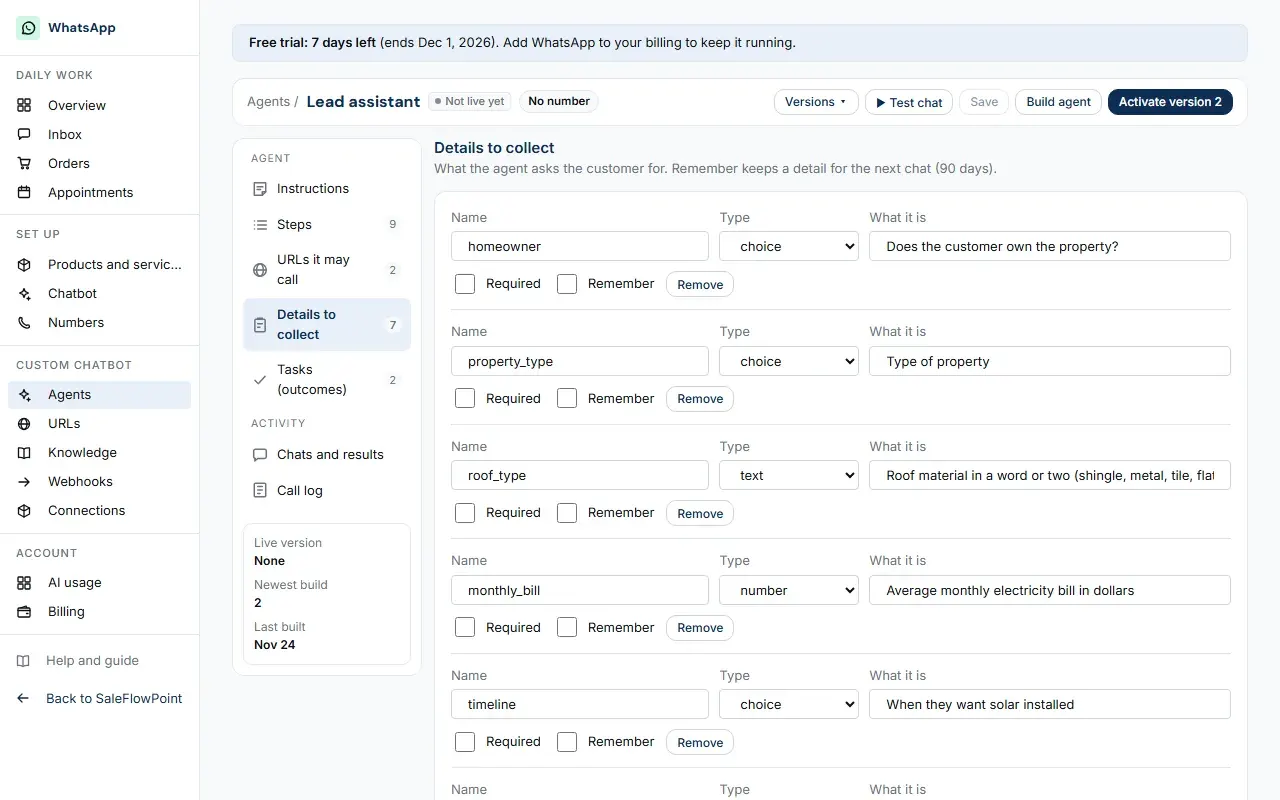
- Details to collect:
- homeowner - type choice (yes, no); required: no; what it is: Does the customer own the property?
- property_type - type choice (house, townhouse, business); required: no; what it is: Type of property
- roof_type - type text; required: no; what it is: Roof material in a word or two (shingle, metal, tile, flat, not sure)
- monthly_bill - type number; required: no; what it is: Average monthly electricity bill in dollars
- timeline - type choice (within 3 months, 3 to 6 months, later, just looking); required: no; what it is: When they want solar installed
- lead_score - type choice (hot, warm, cold); required: no; what it is: Lead score worked out by the rules, never asked
- customer_name - type text; required: no; what it is: Customer's full name
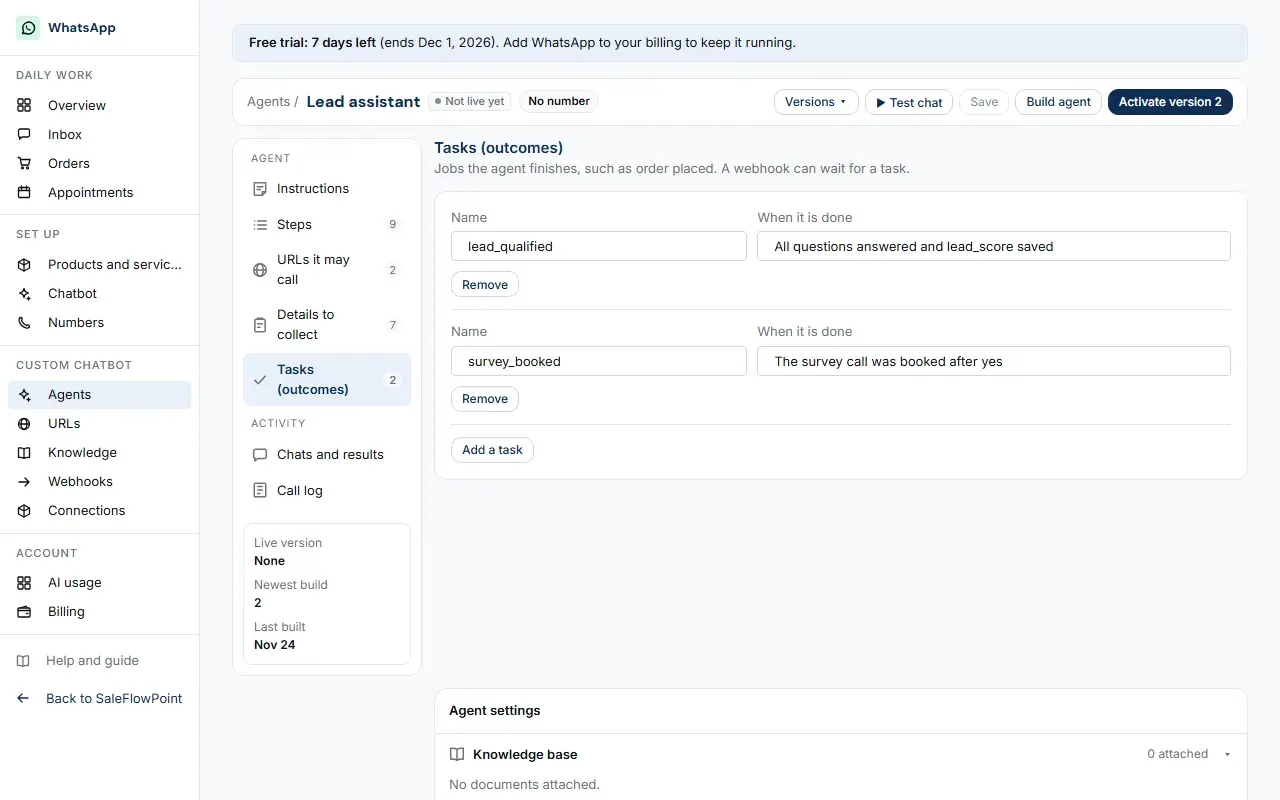
- Tasks (outcomes):
- lead_qualified - when it is done: All questions answered and lead_score saved
- survey_booked - when it is done: The survey call was booked after yes
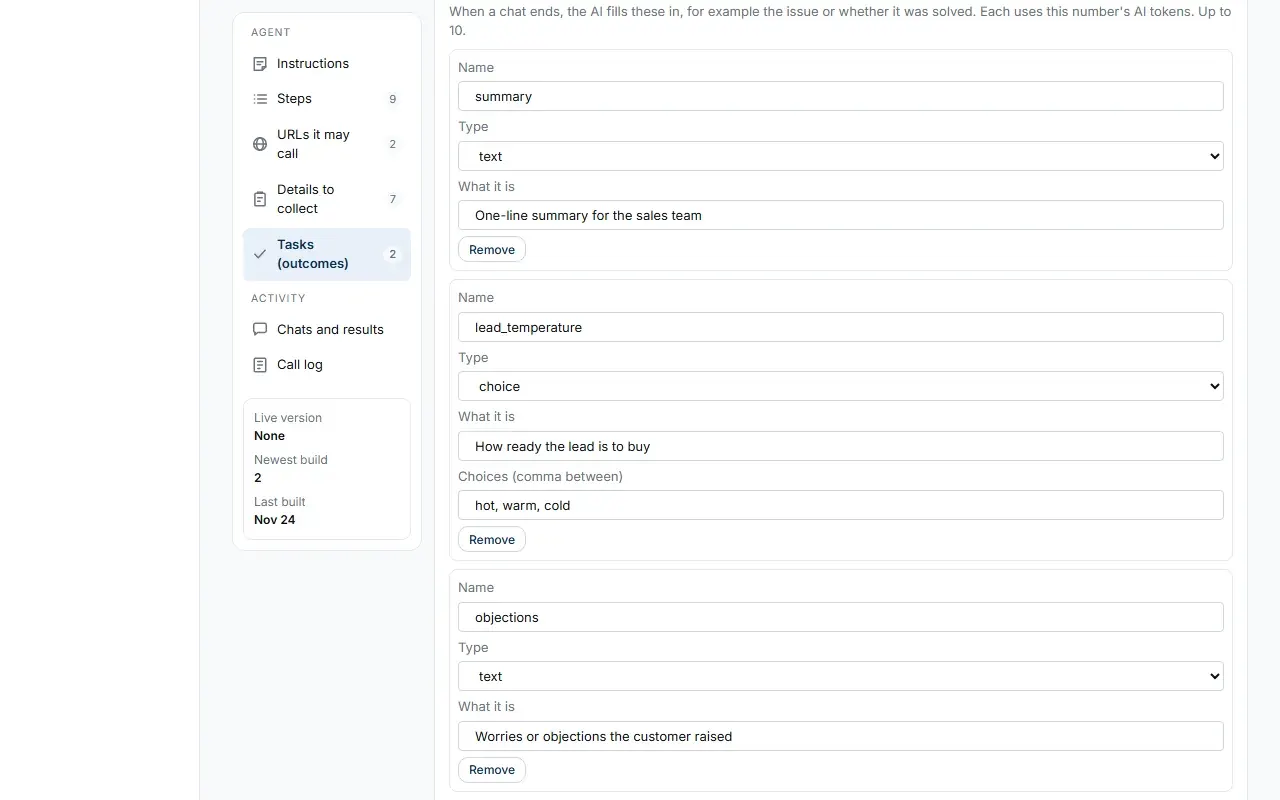
- After the chat (on the right, After the chat, Add a field):
- summary - type text; what it is: One-line summary for the sales team
- lead_temperature - type choice (hot, warm, cold); what it is: How ready the lead is to buy
- objections - type text; what it is: Worries or objections the customer raised
Step 6: webhooks for your team
- WhatsApp, then Webhooks, Add webhook, with your own https receiver as the address (your CRM, helpdesk or automation tool):
- When: a task is done; task name: lead_qualified; send: only when the detail lead_score equals hot
- When: a task is done; task name: survey_booked; send: always
- Copy the signing secret while it is shown (once), then attach the webhook in the agent under Webhooks.
- A condition can only test saved details, not after-chat fields: that is why the score or rating is a detail.
- In the test chat a webhook is only listed as would be sent; live chats really post it.
Step 7: build and test
Press Build agent. Read each AI-check warning, tick it if it is fine, and build again. Then press Test chat, enter the phone of a test customer, and untick Dry run only when you want the writes to really happen. A yes can be any wording or language ("sounds good", "go ahead", "vale"): the system judges it, and only the request the customer was shown runs.
Customer: Hi, I'm interested in solar panels for my home
[step q_owner]
Agent: Hi, thanks for contacting Northwind Solar Installers! I can answer questions and set up a free survey call. First, do you own the property?
Customer: Yes, we own it
[step q_property]
Agent: What type of property is it?
Customer: A house
[step q_roof]
Agent: What is your roof material in a word or two (e.g., shingle, metal, tile, flat, not sure)?
Customer: ¿Cuánto tiempo tarda la instalación? Our roof is asphalt shingle
[step q_bill]
Agent: La instalación toma de 1 a 2 días después de los permisos (los permisos tardan de 2 a 6 semanas).
¿Cuál es su factura de electricidad mensual promedio en dólares?
Customer: Around 220 a month in summer
[step q_timeline]
Agent: When do you want solar installed?
Customer: Within the next 3 months ideally
[step offer_call]
[webhook outcome.lead_qualified: would be sent]
[webhook outcome.lead_qualified: would be sent]
Agent: Thank you! Would you like to schedule a free 20-minute survey call with our energy advisor Marcus Reed?
Customer: Yes, next Tuesday afternoon works
[open_slots 200]
[step offer_call]
Agent: We have an open slot next Tuesday, Dec 1 at 3:00 PM (America/Chicago time). Would that work for you? If so, what is your full name?
Customer: The 2 PM one. I'm Jordan Ellis
[open_slots 200]
[step offer_call]
Agent: We have a slot on Tuesday, Dec 1 at 2:00 PM (America/Chicago time). Would you like to confirm this booking?
Customer: sounds good
[the system judged this a yes]
[book_survey_call 201]
[step offer_call]
[webhook outcome.lead_qualified: would be sent]
[webhook outcome.survey_booked: would be sent]
Agent: Your free survey call is successfully booked!
Reference ID: {request id}
Time: Tue 1 Dec 2026, 2:00 PM (America/Chicago time)
[Finish chat and analyse: {"summary": "Homeowner with asphalt shingle roof and 220 US dollars/mo electric bill booked a survey call for Dec 1.", "lead_temperature": "hot", "objections": "Asked how long the installation takes"}]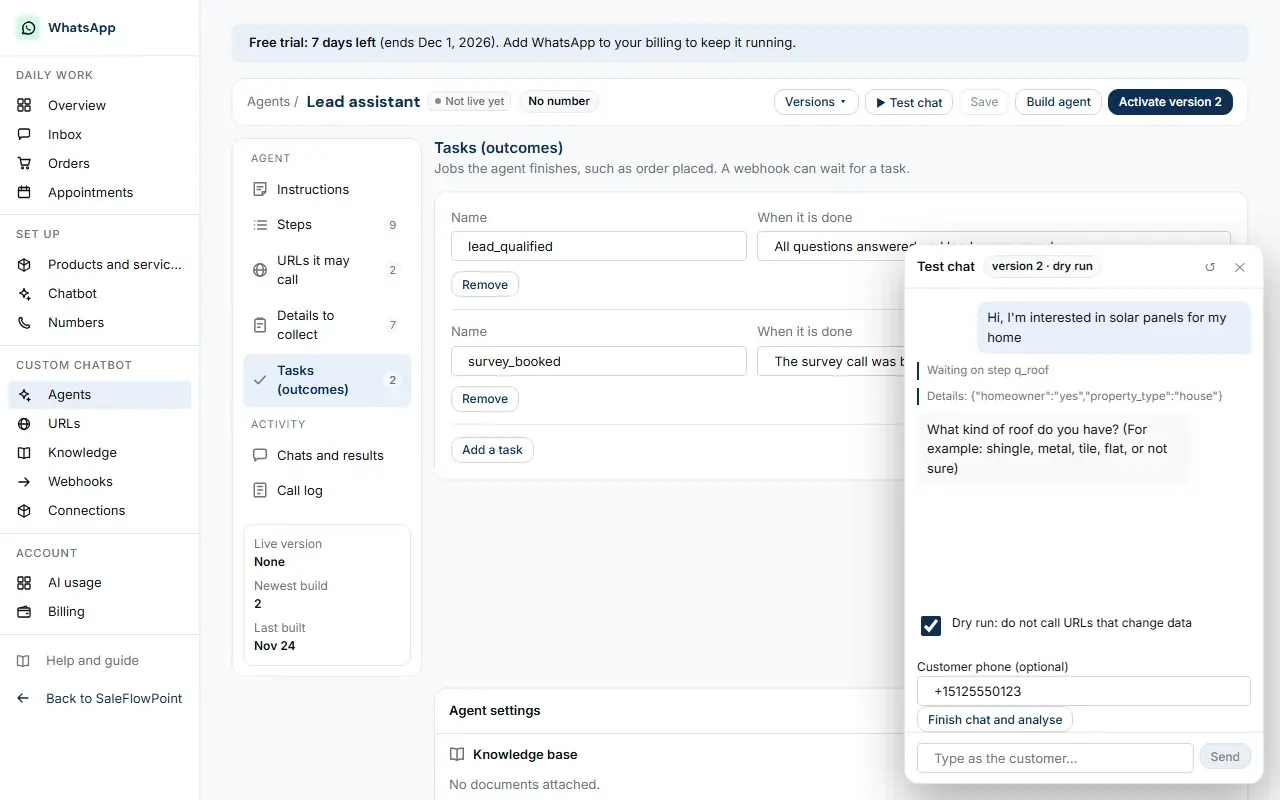
What we saw in testing
- Each step asked one question; a Spanish question about installation time was answered in Spanish first, and the next step carried on.
- lead_score is a detail the AI saves by the rules in the score step, so the webhook condition "lead_score equals hot" works. After-chat fields (like lead_temperature) cannot be used in a webhook condition.
- The booking time is checked by the agent API; a time without its time zone is now refused with a clear message (in an earlier run it failed, see our test notes).
- The lead_qualified task fired more than once in the same chat (the Outcome step and the AI both marked it). Treat repeats of the same chat as one lead.
Step 8: connect a number and choose Custom chatbot
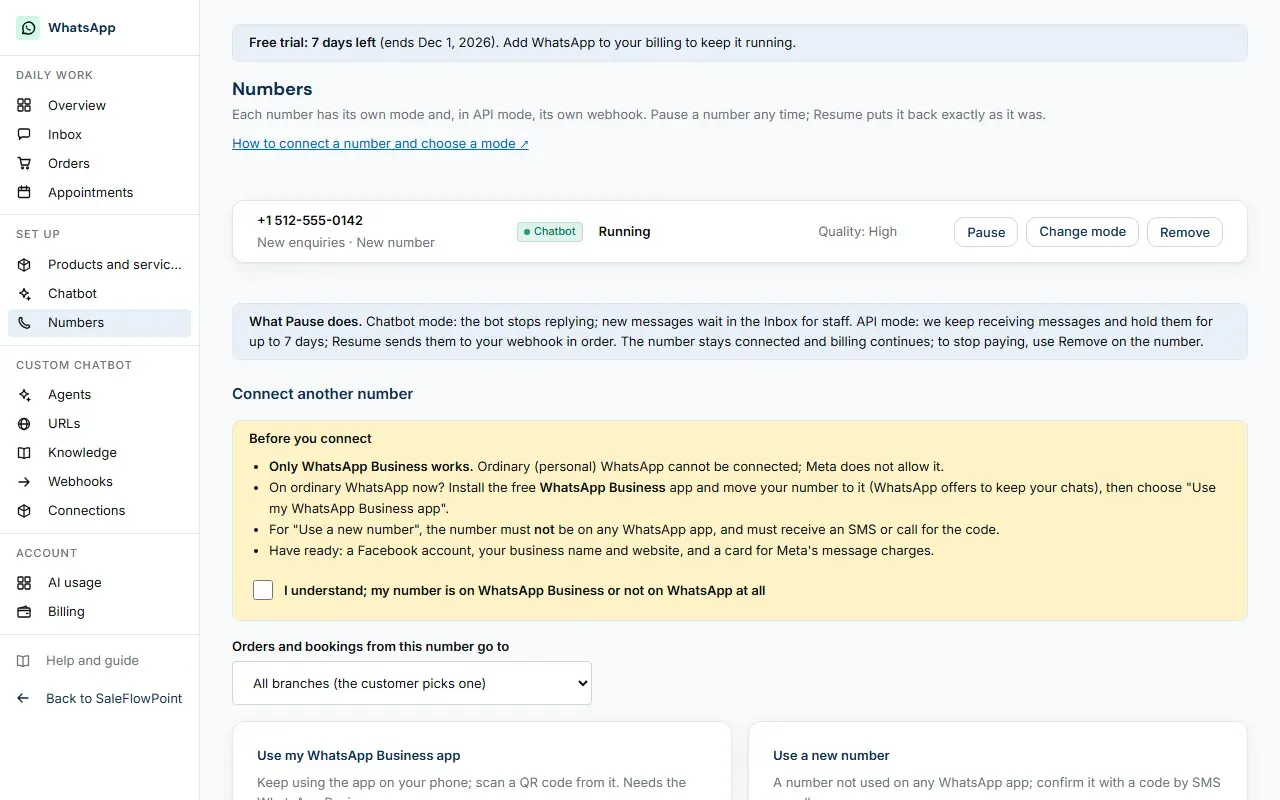
- WhatsApp, then Numbers. Tick that your number is on WhatsApp Business (or on no WhatsApp at all), then Connect with QR code (keep the WhatsApp Business app) or Connect a new number, and finish Meta's sign-up.
- The number then shows on Numbers (in our demo the invented +1 512-555-0142). Press Change mode on it.
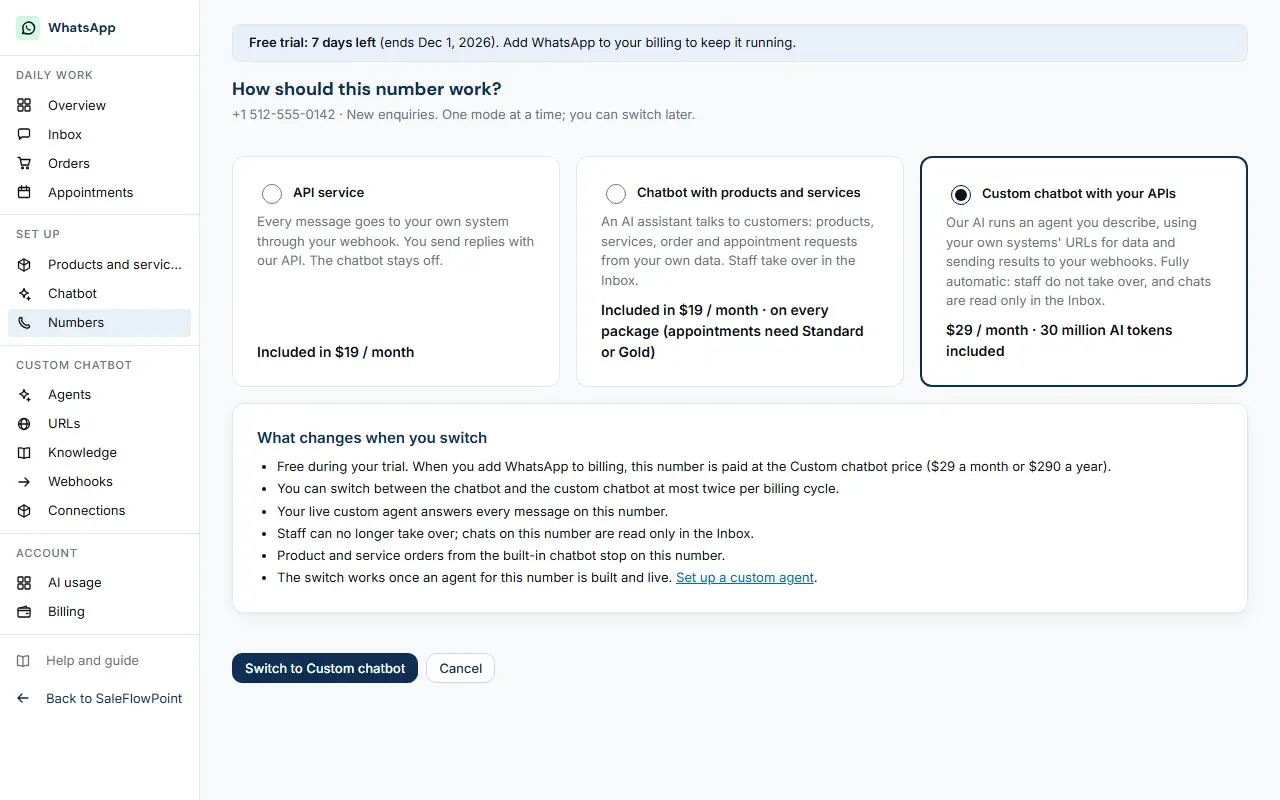
- On How should this number work?, choose Custom chatbot with your APIs (the other two are API service and Chatbot with products and services), read What changes when you switch, and press Switch to Custom chatbot.
- During the WhatsApp trial the custom chatbot costs nothing; after that the number is paid at the Custom chatbot price.
Step 9: go live
In the agent, choose that number under WhatsApp number and press Activate version. New chats use that version at once, and Pause stops every chat. Knowledge documents, contact memory and after-chat results then run on every real chat.