

WhatsApp API mode: send and receive from your own system
API keys, the webhook, sending messages, media, templates and group chats, with example values.
On this page
When to use API mode
Choose API mode when your own system (an online shop, a booking system, an ERP) should handle the messages. Every message a customer sends goes to your webhook; your system replies through the SaleFlowPoint API. No AI is used, so API mode uses no AI tokens. Price: $19 a month or $199 a year per number.
After you switch a number to API mode, API and webhooks appears in the WhatsApp menu. Each number in API mode has its own webhook, secret and delivery log.
Make an API key
- Open WhatsApp > API and webhooks and scroll to the keys.
- Type a name, for example Online shop, and create the key.
- Copy the key now. It is shown only once and starts with
sfp_live_. - Keep it on your server only, never in a browser or a phone app.
Revoking a key stops every system that uses it at once, and cannot be undone. One key works for the whole WhatsApp API and the company agent API.
Limits on a key (optional)
Tick Set limits when you make a key, or press Limits on a key later and Save limits. A key with no limits keeps full access, never expires and works from any address, as before.
- Scopes: untick Full access (every endpoint) and choose only what the system needs, for example
wa:sendfor a system that only sends, oragent:bookingsfor a booking chatbot. A call outside the key's scopes answers403 api_key_scope_missing. - Expires on (optional, end of day UTC): after that day the key answers
401 api_key_expired. Make the next key before the date. - Allowed IPs (optional): one IPv4 or IPv6 address or CIDR range per line, up to 20. A call from any other address answers
403 api_key_ip_not_allowed. One wrong line stops the whole save.
Every scope is listed in the developer docs.
Set the webhook
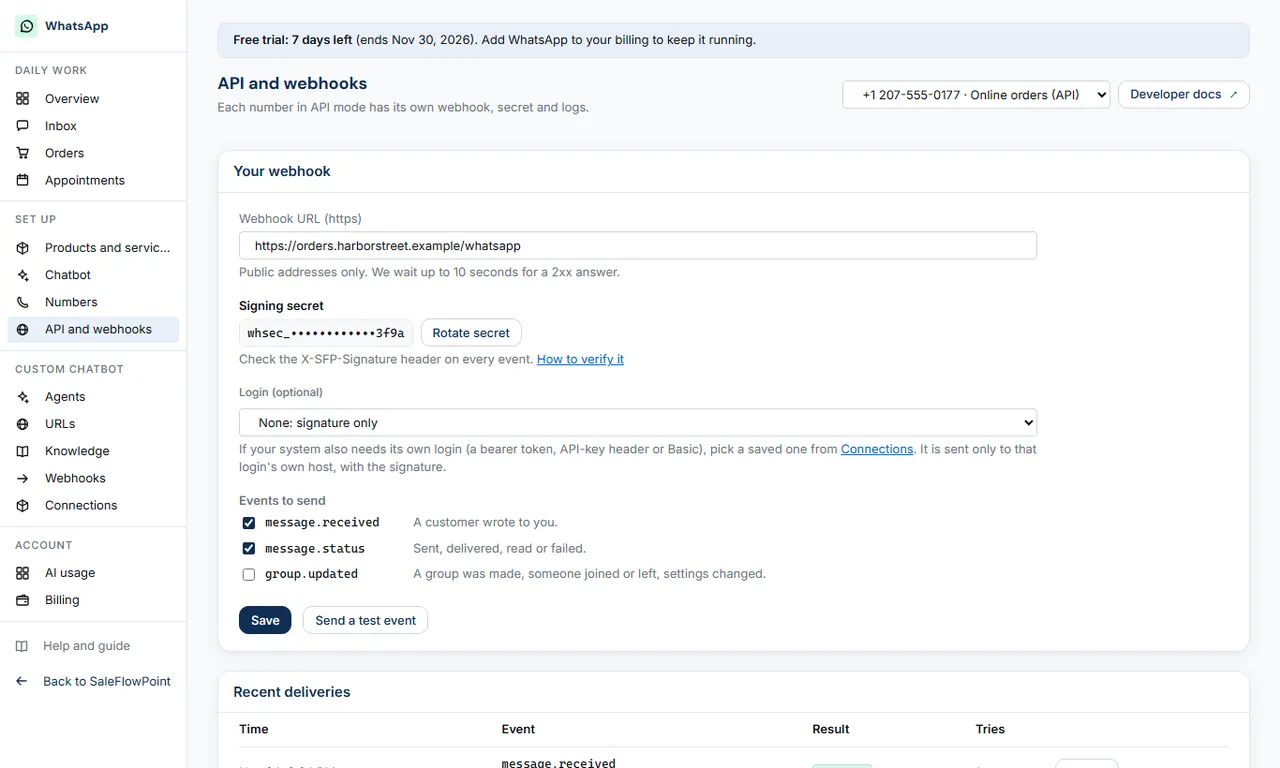
- Pick the number, for example +1 207-555-0177.
- Enter the Webhook URL (https), for example
https://orders.harborstreet.example/whatsapp. Public addresses only; SaleFlowPoint waits up to 10 seconds for a 2xx answer. - Tick the events:
message.received(a customer wrote),message.status(sent, delivered, read or failed), andgroup.updatedif you use groups. - Save, copy the signing secret (shown once), then click Send a test event and check Recent deliveries.
Every delivery carries X-SFP-Signature: t=<unix seconds>,v1=<hex>: the HMAC-SHA256 of t + "." + raw body with your signing secret. Check it in constant time and refuse timestamps older than 5 minutes. A new secret is shown once; the old one keeps working for 24 hours so your system can switch over. Login (optional) adds a saved login if your address needs one.
Send a message
Send with POST /api/v1/wa/messages on saleflowpoint.com. Use an Idempotency-Key header so a retry never sends twice.
curl -X POST https://saleflowpoint.com/api/v1/wa/messages \
  -H "Authorization: Bearer sfp_live_..." \
  -H "Content-Type: application/json" \
  -H "Idempotency-Key: order-1042-ready" \
  -d '{"to": "12075550142", "type": "text", "text": "Your order WA-1042 is ready for pickup."}'
Free text can only be sent inside the 24-hour window after the customer last wrote. Outside it, send an approved template (type: "template"). With several API numbers add number_id. reply_to with a message id quotes the customer's message.
Message types: text, template, image, video, audio, document, sticker, location, contacts, buttons, list and reaction. Rate limit: 300 requests a minute per key.
Media and templates
| Attachment | Formats | Largest |
|---|---|---|
| Image | JPEG, PNG | 5 MB |
| Video | MP4, 3GPP | 16 MB |
| Audio | AAC, MP4, MPEG, AMR, OGG | 16 MB |
| Document | PDF, text, Word, Excel, PowerPoint | 20 MB upload (up to 100 MB by https link) |
Upload with POST /wa/media, then send the returned id. Download a customer's attachment with GET /wa/media/{id}; only attachments that came in on your own numbers are served, and Meta keeps them for about 30 days. GET /wa/templates lists your approved templates; POST /wa/messages/{wamid}/read shows the customer blue ticks; GET /wa/conversations gives the history.
Group chats (Official Business Accounts only)
Group chats work only on numbers with an Official Business Account (the blue badge). A number also used in the WhatsApp Business app (connected with the QR code) cannot use groups: group calls answer 409 group_not_available.
- A group holds up to 8 participants, who join only by the group's invite link.
POST /groupsanswers202with statuscreating; agroup.updatedevent brings the invite link when WhatsApp has made it.- Send to a group with
group_idinstead ofto(text, template, image, video, audio, document). - Group chats never get the chatbot or a custom chatbot and do not appear in the Inbox's contact list.
Every part of the API and webhooks page
At the top, Number picks which API-mode number the page shows (with several), and Developer docs opens the full reference. With no number in API mode the page says so and points to the Numbers page.
| Panel | Fields and options | Limits and defaults |
|---|---|---|
| Your webhook | Webhook URL (https); Signing secret with Rotate secret and How to verify it; Login (optional), None: signature only or a saved Connection; Events to send; Save; Send a test event | URL up to 500 characters, public addresses only; we wait up to 10 seconds for a 2xx answer. A login is sent only to its own host, with the signature |
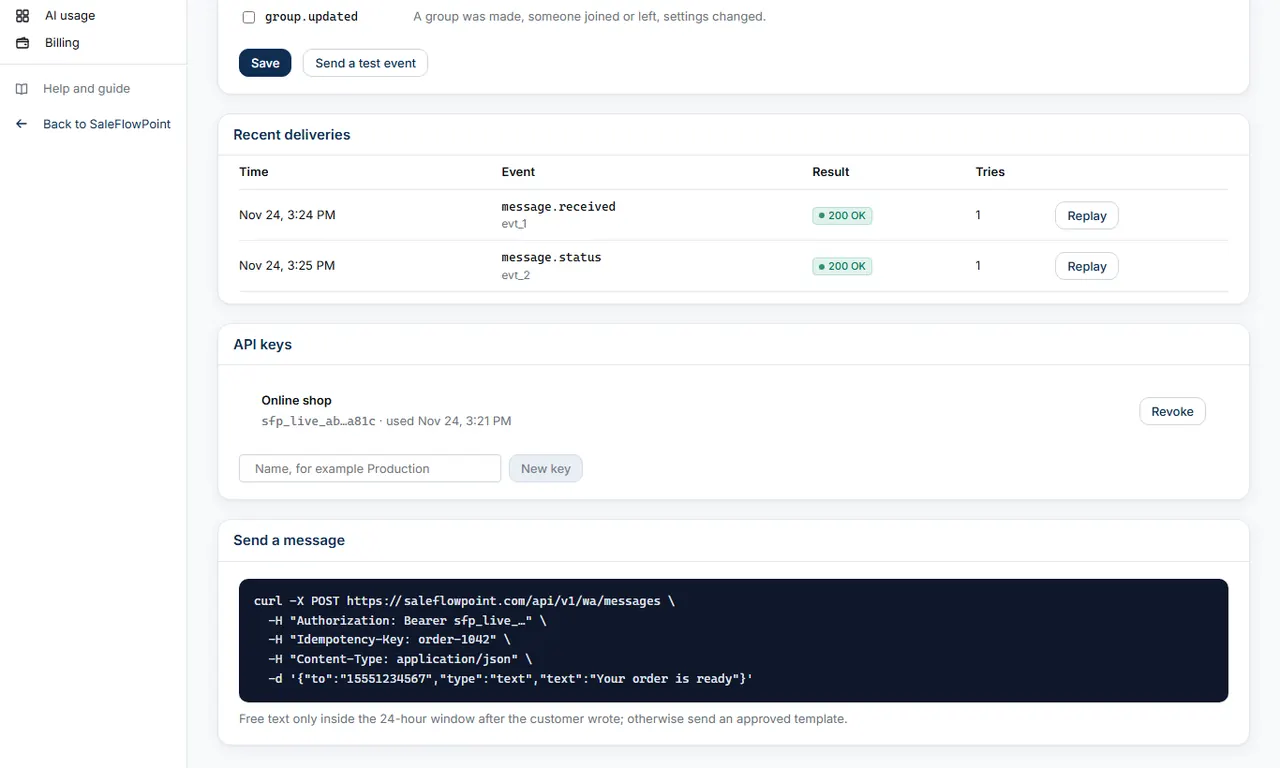
| Recent deliveries | Time, Event (with its event id), Result, Tries; Replay | Result is the answer code (for example 200 OK), Failed with the last error, Waiting, or the next try time. Replay is not offered while a delivery is still waiting |
| API keys | Each key's name; Revoke; New key name; New key | Name up to 60 characters. The key is shown once. Revoking stops systems using it at once and cannot be undone |
| Send a message | A ready curl example for this number | Free text only inside the 24-hour window after the customer wrote; otherwise send an approved template |
Full API reference
Every endpoint, with examples in curl, Node.js, Python and PHP and a Try it panel, is in the WhatsApp API developer guide.
Worked examples
- Connect Your Own System to WhatsApp with an API: Send and receive WhatsApp messages from your own software: an API key, a send API, signed webhooks, safe retries and two message ids, with a short example.
Next: Chatbot mode · All WhatsApp guide pages
Try WhatsApp free for 7 days
Register your shop, connect a WhatsApp Business number and start the trial.