Add and Test Business Central URLs for a WhatsApp Agent
Step 2 of the series: every field of a URL, and how to test it against Business Central
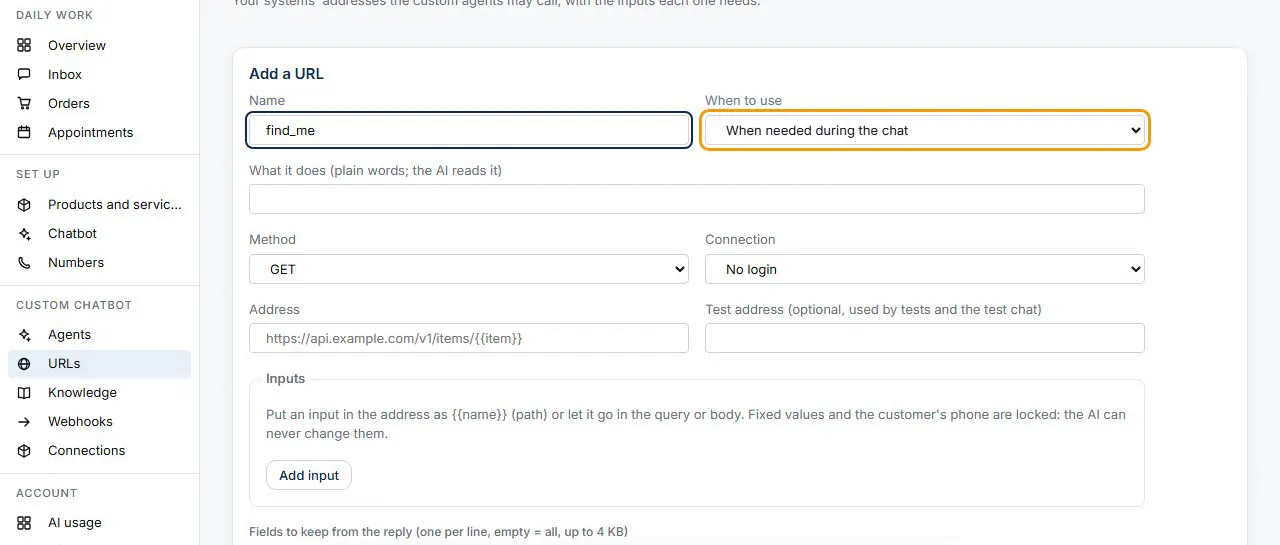
This guide is part of a series on a WhatsApp sales agent for Microsoft Business Central, built with SaleFlowPoint's custom chatbot (Mode 3). Every value below is the one we typed on our own demo account, so you can copy it and change only your own names and ids. The data is Microsoft's CRONUS USA demo company in our own Business Central sandbox, and the shops are invented: Summit Office Supply in Denver (quotes), Brightwater Furniture Co. in Charlotte (orders and order status) and Northgate Workspace in Minneapolis (answers only). Ids are shown as {tenant}, {environment} and {company}; amounts are in US dollars.
What a URL is
A URL is one address in Business Central that an agent may call, with the inputs it needs. Open WhatsApp, then URLs, and press Add a URL once for each URL below. Every agent in the series uses find_me and search_items; Summit adds create_quote, Brightwater adds create_order and my_orders. You can also Import a cURL command or an OpenAPI file, but here every field is typed by hand so you see what each one does.
Words used in the Inputs tables: Filled by is who gives the value (the AI from the chat, the customer's phone, or a saved detail). Goes in is Path (inside the address, as {{name}}), Query or Body. Inside '...' of an OData filter = Yes makes SaleFlowPoint escape quotes, so a customer cannot break out of the filter. Place in the body puts a value at a nested place in the JSON body.
URL: find_me
- Name: find_me
- What it does: Finds the customer's Business Central account from their WhatsApp number.
- When to use: At chat start
- Method: GET
- Connection: Business Central (CRONUS)
- Fields to keep from the reply: value[0].number and value[0].displayName (one per line)
- Ask the customer "yes" before calling it: not ticked (it only reads)
- Timeout: 10 seconds. Retries: 1. Waiting text: empty
https://api.businesscentral.dynamics.com/v2.0/{tenant}/{environment}/api/v2.0/companies({company})/customers?$filter=phoneNumber eq '{{phone}}'&$select=number,displayName&$top=1Inputs (press Add input for each):
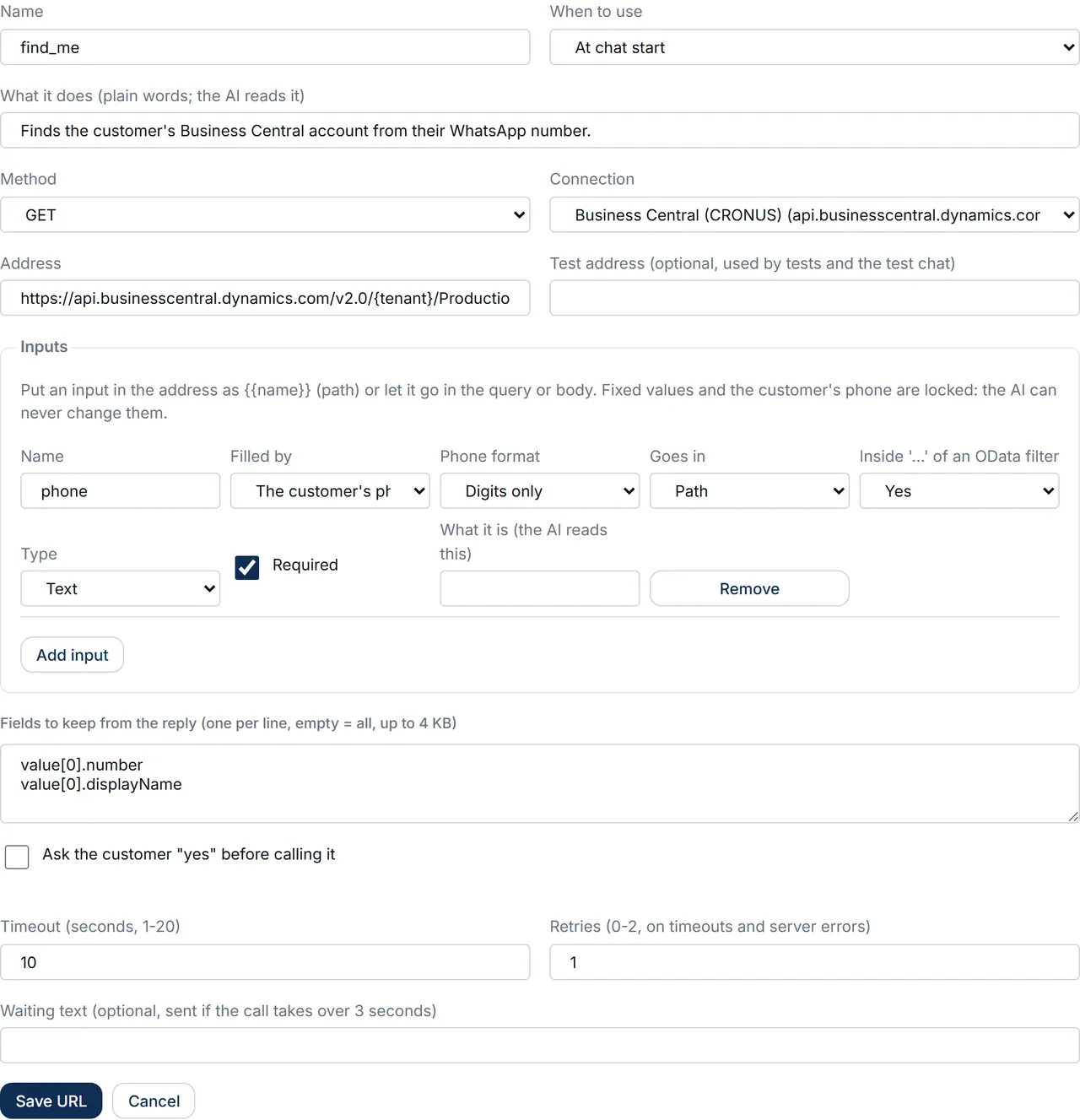
- phone: Filled by The customer's phone; Phone format Digits only; Goes in Path; Inside '...' of an OData filter Yes; Type Text; Required yes
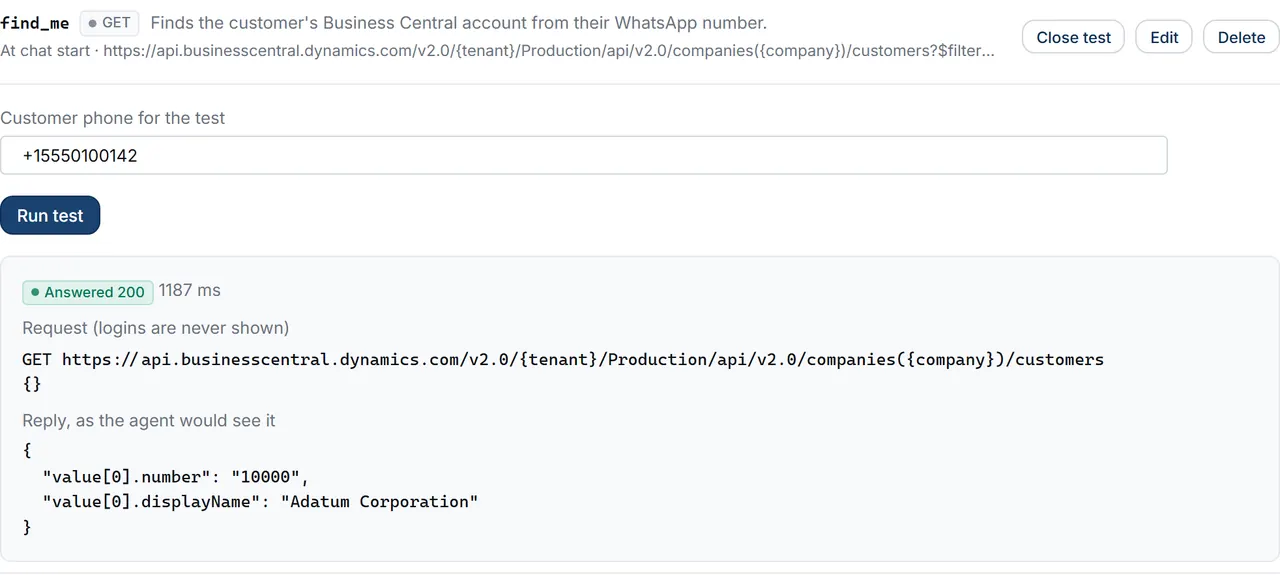
Test: press Test on the find_me row, type +15550100142 in Customer phone for the test (in CRONUS this number belongs to Adatum Corporation, customer 10000) and press Run test.
{
  "value[0].number": "10000",
  "value[0].displayName": "Adatum Corporation"
}
URL: search_items
- Name: search_items
- What it does: Search the Business Central catalogue for items by a word of their name. Gives each item's id, number, name, unit price in US dollars, stock on hand and unit.
- When to use: When needed during the chat
- Method: GET
- Connection: Business Central (CRONUS)
- Fields to keep: empty (the address already selects only the fields we need)
- Ask the customer "yes" before calling it: not ticked
- Timeout: 10 seconds. Retries: 1. Waiting text: Checking our stock...
https://api.businesscentral.dynamics.com/v2.0/{tenant}/{environment}/api/v2.0/companies({company})/items?$filter=contains(displayName,'{{lower}}') or contains(displayName,'{{title}}') or contains(displayName,'{{upper}}')&$select=id,number,displayName,unitPrice,inventory,baseUnitOfMeasureCode&$top=10Inputs (press Add input for each):
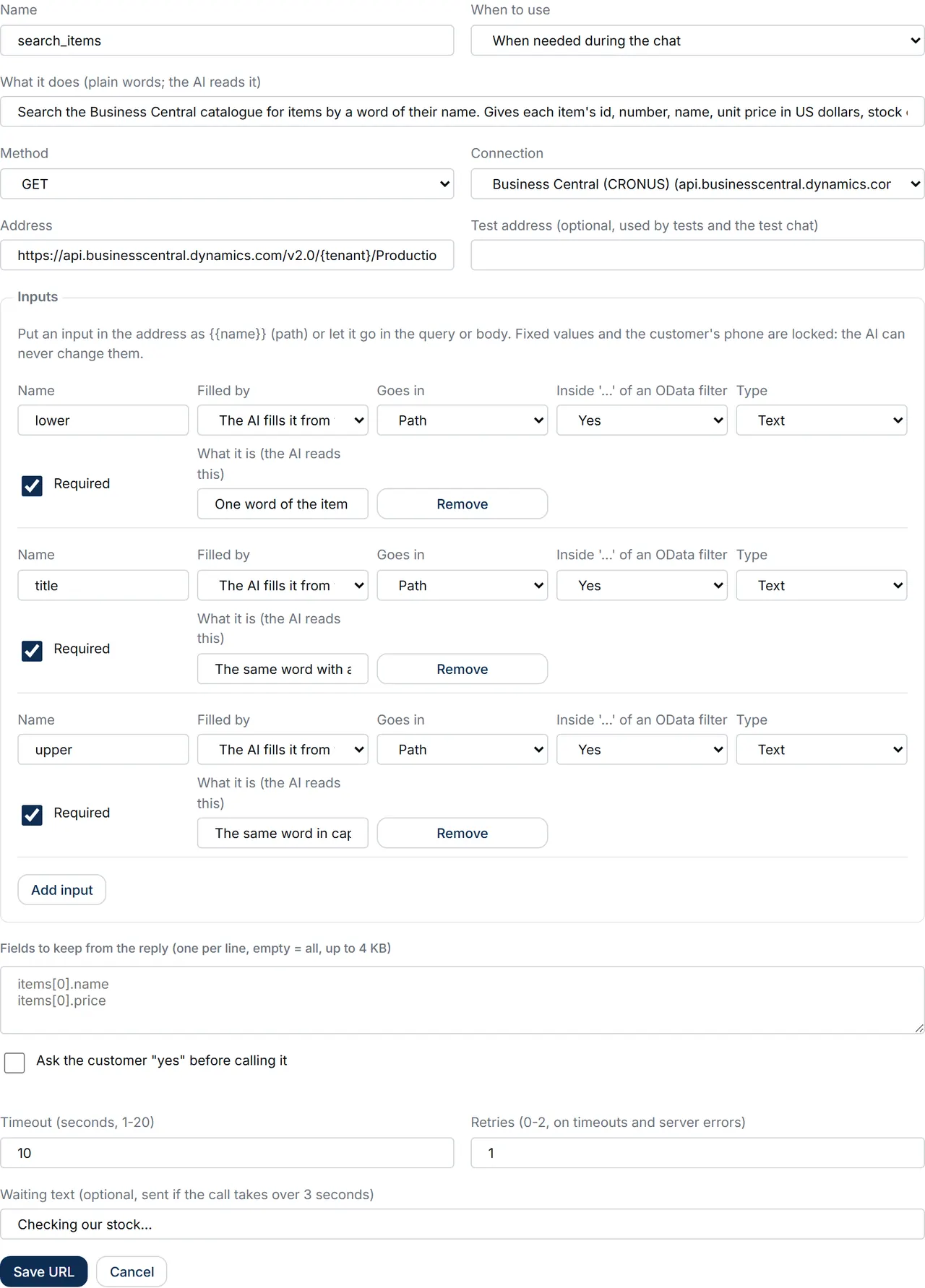
- lower: Filled by The AI fills it from the chat; Goes in Path; OData filter Yes; Type Text; Required yes; What it is (the AI reads this): One word of the item the customer wants, singular, in lower case, e.g. chair
- title: Filled by The AI fills it from the chat; Goes in Path; OData filter Yes; Type Text; Required yes; What it is (the AI reads this): The same word with a capital first letter, e.g. Chair
- upper: Filled by The AI fills it from the chat; Goes in Path; OData filter Yes; Type Text; Required yes; What it is (the AI reads this): The same word in capitals, e.g. CHAIR
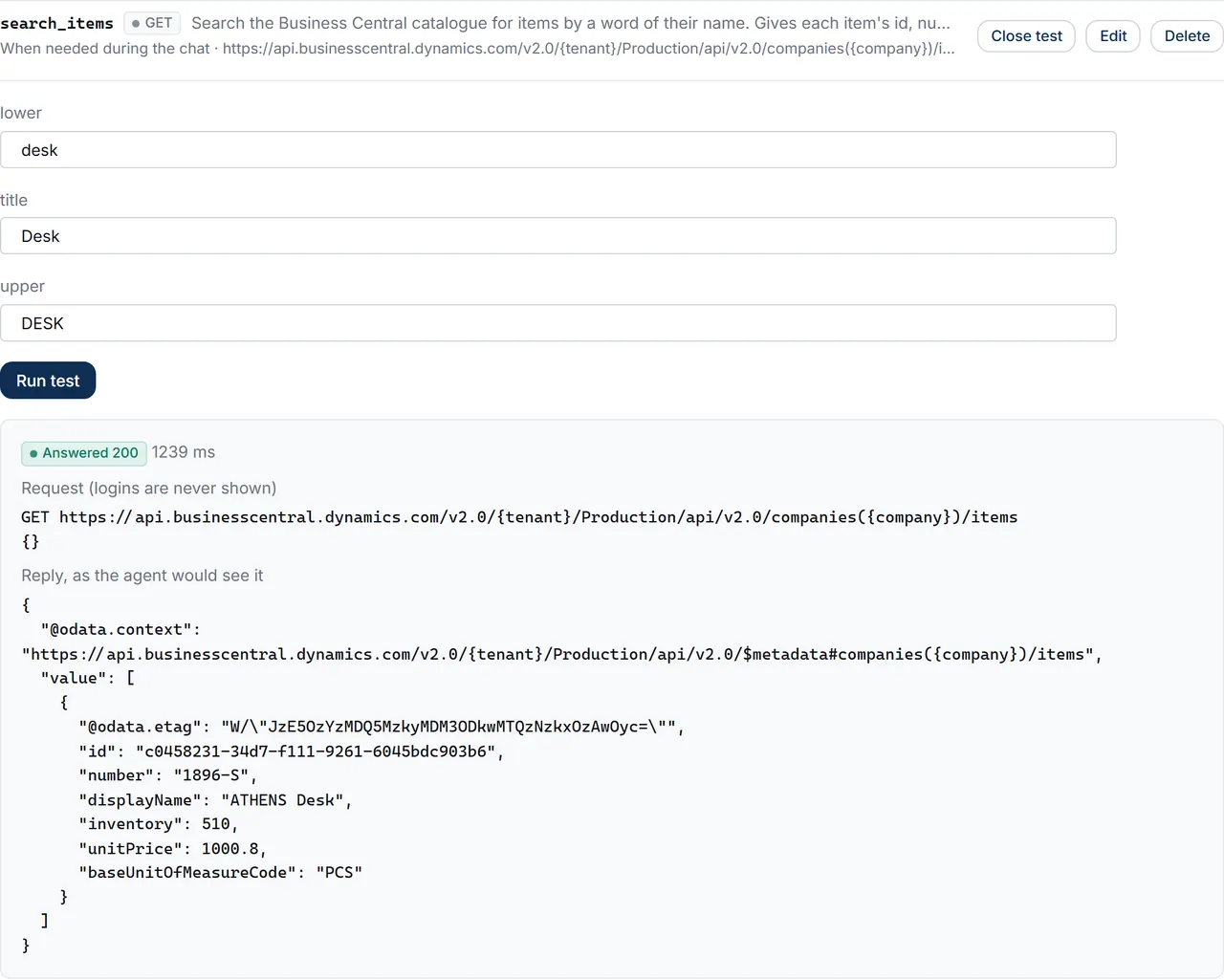
Test: lower desk, title Desk, upper DESK, then Run test. Business Central's contains() is case-sensitive, which is why the word is sent three ways.
{
  "value": [
    {
      "id": "{item-id}",
      "number": "1896-S",
      "displayName": "ATHENS Desk",
      "inventory": 510,
      "unitPrice": 1000.8,
      "baseUnitOfMeasureCode": "PCS"
    }
  ]
}
URL: create_quote (Summit Office Supply)
- Name: create_quote
- What it does: Creates a sales quote in Business Central for this customer with up to 5 items. Gives the quote number, each line's price and the totals before and after tax.
- When to use: When needed during the chat
- Method: POST
- Connection: Business Central (CRONUS)
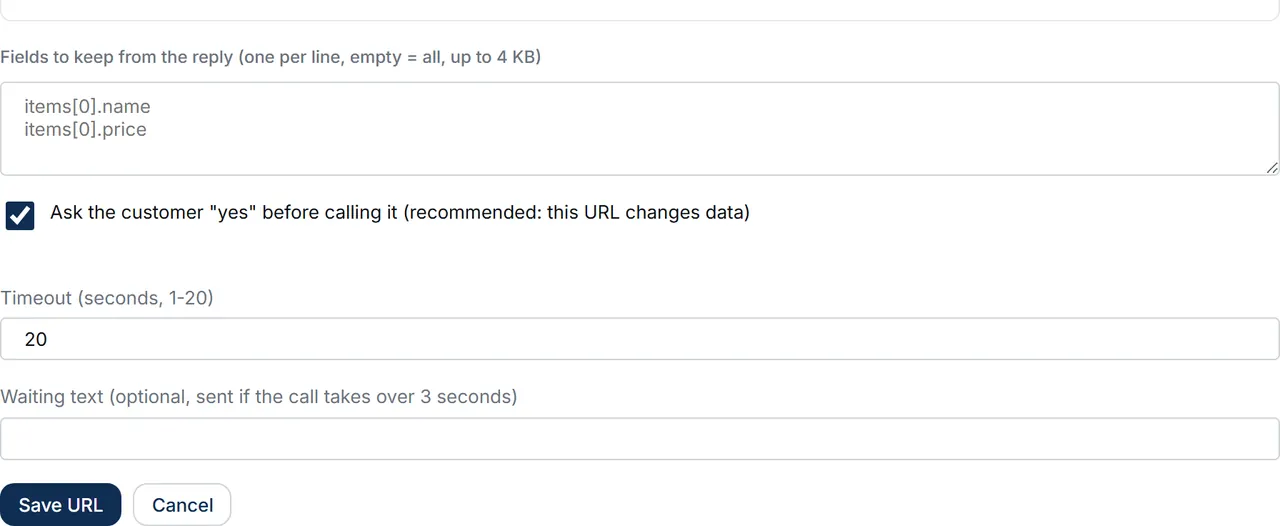
- Fields to keep: empty
- Ask the customer "yes" before calling it: TICKED (it changes data in Business Central)
- Timeout: 20 seconds. Retries: 0 (a write is never repeated by itself). Waiting text: Preparing your quote...
https://api.businesscentral.dynamics.com/v2.0/{tenant}/{environment}/api/v2.0/companies({company})/salesQuotes?$expand=salesQuoteLines($select=description,quantity,unitPrice,amountIncludingTax)&$select=number,customerName,totalAmountExcludingTax,totalTaxAmount,totalAmountIncludingTaxInputs (press Add input for each):
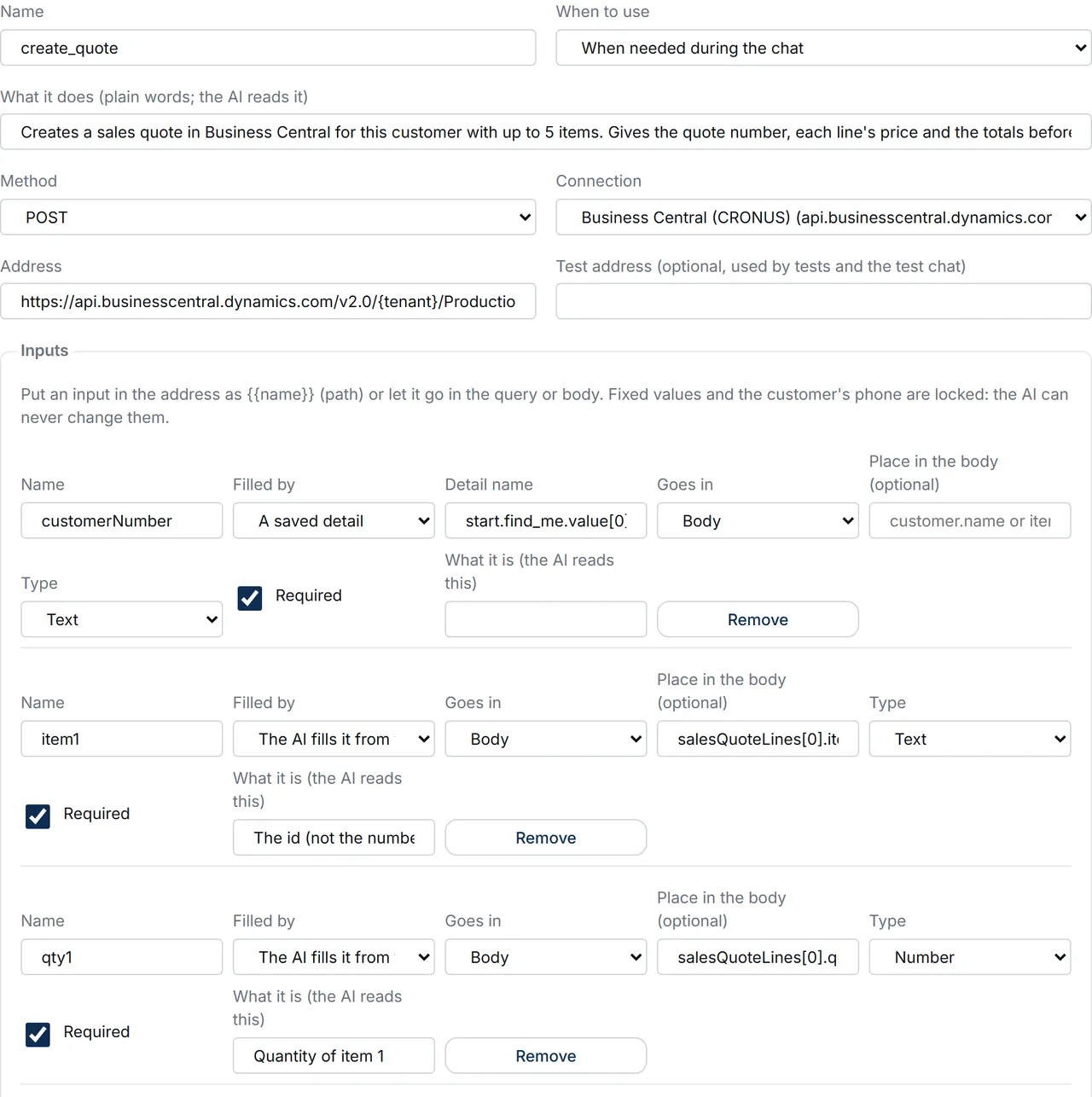
- customerNumber: Filled by A saved detail; Goes in Body; Type Text; Required yes; Notes: Detail name: start.find_me.value[0].number
- item1: Filled by The AI fills it from the chat; Goes in Body; Place in the body salesQuoteLines[0].itemId; Type Text; Required yes; Notes: The id (not the number) of item 1 from search_items
- qty1: Filled by The AI fills it from the chat; Goes in Body; Place in the body salesQuoteLines[0].quantity; Type Number; Required yes; Notes: Quantity of item 1
- item2: Filled by The AI fills it from the chat; Goes in Body; Place in the body salesQuoteLines[1].itemId; Type Text; Required no; Notes: The id (not the number) of item 2 from search_items
- qty2: Filled by The AI fills it from the chat; Goes in Body; Place in the body salesQuoteLines[1].quantity; Type Number; Required no; Notes: Quantity of item 2
- item3: Filled by The AI fills it from the chat; Goes in Body; Place in the body salesQuoteLines[2].itemId; Type Text; Required no; Notes: The id (not the number) of item 3 from search_items
- qty3: Filled by The AI fills it from the chat; Goes in Body; Place in the body salesQuoteLines[2].quantity; Type Number; Required no; Notes: Quantity of item 3
- item4: Filled by The AI fills it from the chat; Goes in Body; Place in the body salesQuoteLines[3].itemId; Type Text; Required no; Notes: The id (not the number) of item 4 from search_items
- qty4: Filled by The AI fills it from the chat; Goes in Body; Place in the body salesQuoteLines[3].quantity; Type Number; Required no; Notes: Quantity of item 4
- item5: Filled by The AI fills it from the chat; Goes in Body; Place in the body salesQuoteLines[4].itemId; Type Text; Required no; Notes: The id (not the number) of item 5 from search_items
- qty5: Filled by The AI fills it from the chat; Goes in Body; Place in the body salesQuoteLines[4].quantity; Type Number; Required no; Notes: Quantity of item 5
customerNumber comes from the find_me reply, so the AI can never put a quote on another customer's account. With Place in the body, SaleFlowPoint builds this body (5 lines at most; empty lines are left out):
{
  "customerNumber": "10000",
  "salesQuoteLines": [
    { "itemId": "{ATHENS Desk id}", "quantity": 2 },
    { "itemId": "{PARIS Guest Chair, black id}", "quantity": 4 }
  ]
}
Do not press Test on create_quote: a test would make a real quote. It is tested from the test chat, after the customer's yes.
{
  "number": "S-QUO1026",
  "customerName": "Adatum Corporation",
  "totalAmountExcludingTax": 2772.8,
  "totalTaxAmount": 83.18,
  "totalAmountIncludingTax": 2855.98,
  "salesQuoteLines": [ ... one line per item ... ]
}URL: create_order (Brightwater Furniture Co.)
- Name: create_order
- What it does: Creates a sales order in Business Central for this customer with up to 5 items. Gives the order number, each line's price and the totals before and after tax.
- When to use: When needed during the chat
- Method: POST
- Connection: Business Central (CRONUS)
- Ask the customer "yes" before calling it: TICKED
- Timeout: 20 seconds. Retries: 0. Waiting text: Placing your order...
https://api.businesscentral.dynamics.com/v2.0/{tenant}/{environment}/api/v2.0/companies({company})/salesOrders?$expand=salesOrderLines($select=description,quantity,unitPrice,amountIncludingTax)&$select=number,customerName,totalAmountExcludingTax,totalTaxAmount,totalAmountIncludingTax,requestedDeliveryDateInputs (press Add input for each):
- customerNumber: Filled by A saved detail; Goes in Body; Type Text; Required yes; Notes: Detail name: start.find_me.value[0].number
- item1: Filled by The AI fills it from the chat; Goes in Body; Place in the body salesOrderLines[0].itemId; Type Text; Required yes; Notes: The id (not the number) of item 1 from search_items
- qty1: Filled by The AI fills it from the chat; Goes in Body; Place in the body salesOrderLines[0].quantity; Type Number; Required yes; Notes: Quantity of item 1
- item2: Filled by The AI fills it from the chat; Goes in Body; Place in the body salesOrderLines[1].itemId; Type Text; Required no; Notes: The id (not the number) of item 2 from search_items
- qty2: Filled by The AI fills it from the chat; Goes in Body; Place in the body salesOrderLines[1].quantity; Type Number; Required no; Notes: Quantity of item 2
- item3: Filled by The AI fills it from the chat; Goes in Body; Place in the body salesOrderLines[2].itemId; Type Text; Required no; Notes: The id (not the number) of item 3 from search_items
- qty3: Filled by The AI fills it from the chat; Goes in Body; Place in the body salesOrderLines[2].quantity; Type Number; Required no; Notes: Quantity of item 3
- item4: Filled by The AI fills it from the chat; Goes in Body; Place in the body salesOrderLines[3].itemId; Type Text; Required no; Notes: The id (not the number) of item 4 from search_items
- qty4: Filled by The AI fills it from the chat; Goes in Body; Place in the body salesOrderLines[3].quantity; Type Number; Required no; Notes: Quantity of item 4
- item5: Filled by The AI fills it from the chat; Goes in Body; Place in the body salesOrderLines[4].itemId; Type Text; Required no; Notes: The id (not the number) of item 5 from search_items
- qty5: Filled by The AI fills it from the chat; Goes in Body; Place in the body salesOrderLines[4].quantity; Type Number; Required no; Notes: Quantity of item 5
Inputs are the same as create_quote, with salesOrderLines instead of salesQuoteLines. Not test-run (it would place a real order).
{
  "number": "S-ORD101024",
  "customerName": "Adatum Corporation",
  "totalAmountExcludingTax": 1295.6,
  "totalTaxAmount": 38.87,
  "totalAmountIncludingTax": 1334.47
}
URL: my_orders (Brightwater Furniture Co.)
- Name: my_orders
- What it does: Lists this customer's 5 newest sales orders in Business Central with number, date, status, total and whether it is fully shipped.
- When to use: When needed during the chat
- Method: GET
- Connection: Business Central (CRONUS)
- Ask the customer "yes": not ticked. Timeout: 10 seconds. Retries: 1. Waiting text: empty
https://api.businesscentral.dynamics.com/v2.0/{tenant}/{environment}/api/v2.0/companies({company})/salesOrders?$filter=customerNumber eq '{{customer}}'&$orderby=orderDate desc&$top=5&$select=number,orderDate,status,totalAmountIncludingTax,fullyShipped,requestedDeliveryDateInputs (press Add input for each):
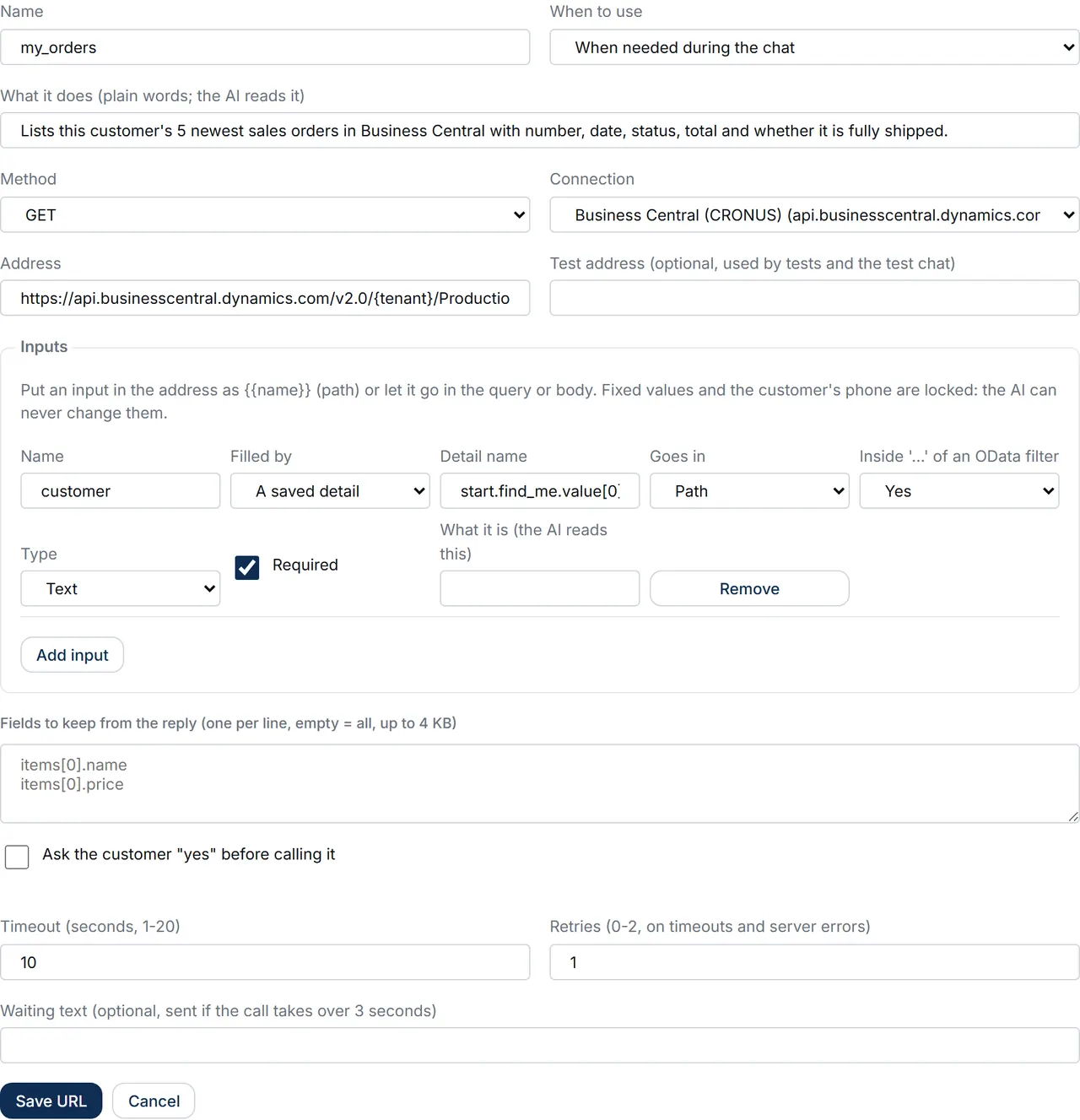
- customer: Filled by A saved detail; Detail name start.find_me.value[0].number; Goes in Path; OData filter Yes; Type Text; Required yes
The customer number comes from find_me, so my_orders can only ever list this customer's own orders. It needs a chat to test, because the number comes from the chat start.
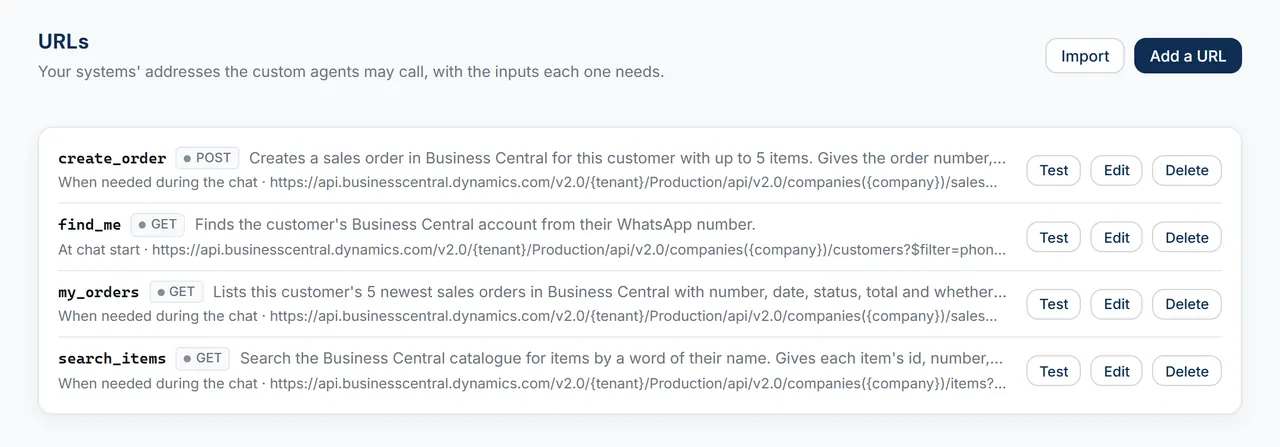
The URL library
Next step
Step 3: the knowledge base: "A WhatsApp Agent Knowledge Base for Delivery and Returns"
The whole series
- Overview: what the agent does: "How to Build an AI Sales Agent on Business Central"
- The whole build on one page: "Connect Business Central to WhatsApp Step by Step"
- Step 1: the connection: "Business Central WhatsApp Agent: Setup and Connection"
- Step 2: the URLs: "Add and Test Business Central URLs for a WhatsApp Agent" (this page)
- Step 3: the knowledge base: "A WhatsApp Agent Knowledge Base for Delivery and Returns"
- Step 4: details, tasks and after-chat results: "WhatsApp Agent Details to Collect and After-Chat Results"
- Step 5: the webhook: "Send WhatsApp Agent Events to Your Systems with Webhooks"
- Step 6: instructions, build and test chat: "Build and Test a Business Central WhatsApp Agent Safely"
- Step 7: the WhatsApp number: "Connect a WhatsApp Number to Your Business Central Agent"
- A read-only stock and price agent: "Real-Time Stock and Prices in WhatsApp from Business Central"